Computed Attributes
Computed attributes allow dynamic modification of position attributes. The most common use cases for computed attributes:
- Map generic inputs and outputs to specific values (for example, ignition value from a generic input)
- Calculate a value on the server side based on other attributes (for example, fuel consumption from an odometer value)
Computed attributes are applied to all incoming positions of a linked device. To link, go into settings, open the devices or groups page, and click on the link icon. Then select attributes in the dropdown.
The order in which computed attributes are applied is defined by the priority parameter. Negative priorities run in the early stage of position processing, before filtering. Zero and positive priorities run in the later stage. Within each stage, higher priority values run first. For example, -1 runs before -2, and both run before a priority of 0.
Each computed attribute has the following fields:
- Description - a human-readable description
- Attribute - name or key of the resulting position attribute
- Expression - an expression to compute, written in JEXL
- Type - output data type (number, boolean or string)
- Priority - processing stage and execution order, as described above
You can pick from a list of standard attributes with predefined types, but it is also possible to define your own custom attribute.
Expression
The expression is the core of the computed attributes feature. It uses a very flexible JEXL syntax to compute the result.
All position fields are mapped as primitive objects (latitude, longitude, speed, course etc); they are always defined. Position attributes are also mapped as primitive objects (satellites, battery, ignition, distance etc). The set of attributes depends on what the device is reporting.
For position attributes, a null result removes any existing attribute with the same name. An empty string is a value and is stored. A null result does not clear top-level position fields such as speed or latitude.
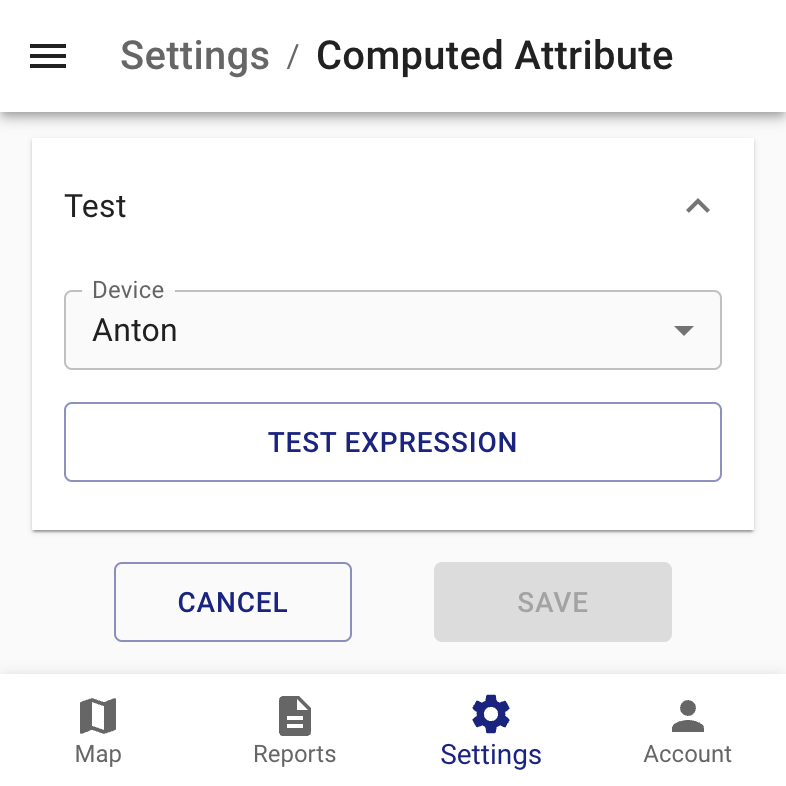
The expression can be tested on the last position of some device.
Using undefined variables will create warning messages in the log. If you are not certain that the device always reports an attribute, then it is recommended to wrap it in a ternary operator to check if the value is present. A ternary operator is a conditional check; examples of this are shown below.
Examples
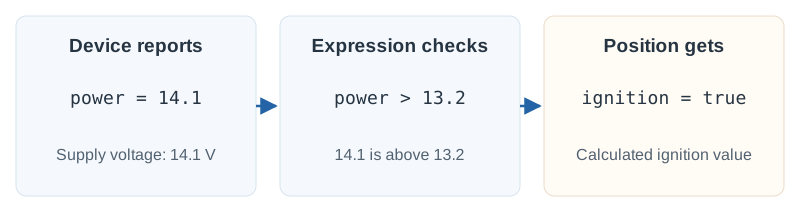
You have a device connected to a vehicle's electrical system that reports its voltage in the "power" attribute, but does not have a separate ignition status input. You can try to use the following computed attribute to assign a value to the ignition attribute:
Ignition
power ? power > 13.2 : null
Boolean
You have a device with some configurable inputs and you connected the ignition wire to the second one.
It is reported as a boolean attribute "in2".
Ignition
in2 ? true : false
Boolean
or as 0/1
Ignition
in2 ? in2 == 1 : false
Boolean
or as a second bit in the flags attribute
Ignition
flags ? (flags & 2) != 0 : false
Boolean
You have a device with some configurable analog inputs and connected a fuel sensor to the first one. Let's say the analog input has 10-bit resolution (0..1023) and a maximum value of 20 volts. The fuel sensor reports the remaining fuel as a voltage from 0 to 12 volts, where 0 V is empty and 12 V is a full 40-liter tank.
Fuel
(adc1 ?? null) != null ? adc1 * 0.065 : null
Number
The ?? operator handles a missing input while preserving a zero reading as zero fuel.
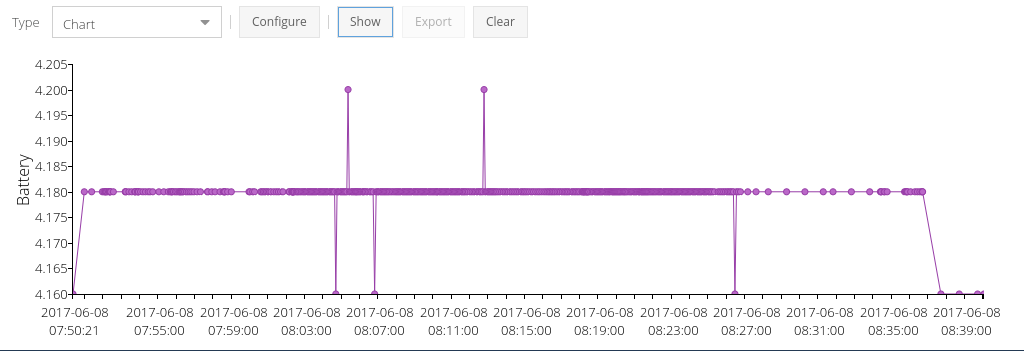
Here is a non-standard case. There is a device that does not have any inputs to determine ignition. It has an internal battery, and its charger is connected to the ACC wire inside the car. It was noticed that when the device is charging it reports 4.18 V battery voltage; if not charging, the voltage is usually less than 4.18 V. Sometimes it fluctuates and speed might be used for additional correction.
Ignition
battery < 4.18 && speed < 1 ? false : true
Boolean
Advanced Expressions
Enable the features required by your expression in the server configuration, then restart Traccar. Configuration entries go in traccar.xml; JEXL code goes in the computed attribute's Expression field.
Local variables
To enable local variables:
<entry key='processing.computedAttributes.localVariables'>true</entry>
For example, create a numeric custom attribute named speedExcess with this expression:
var maxSpeed = 90;
var speedKmh = speed * 1.852;
speedKmh > maxSpeed ? speedKmh - maxSpeed : null
Position speed is in knots. This example converts it to km/h and stores the amount above 90 km/h. For speeding notifications, configure the speedLimit attribute and a Speed Limit Exceeded notification.
Loops
To use loops with local variables, enable both features:
<entry key='processing.computedAttributes.localVariables'>true</entry>
<entry key='processing.computedAttributes.loops'>true</entry>
This expression returns the sum of a list:
var list = [1, 2, 3, 4, 5];
var result = 0;
for (var item : list) {
  result += item;
}
result
JEXL supports for, do while and while loops, as well as break and continue. Keep loops bounded because expressions run for incoming positions.
Creating objects
To enable the new operator:
<entry key='processing.computedAttributes.newInstanceCreation'>true</entry>
For example, new("java.lang.Double", 10) creates a Double with the value 10.0. Traccar restricts which Java classes expressions can instantiate; enabling this setting does not allow arbitrary Java classes.