Maintenance
Maintenance schedules generate Maintenance Required events when an incoming position crosses a configured threshold. Use them for recurring checks based on distance, engine hours or time.
Create a schedule
Open Settings > Maintenance and add a schedule:
| Field | Meaning |
|---|---|
| Name | A description, such as “Oil change”. |
| Type | The position value to monitor, such as Odometer, Total Distance, Engine Hours or Fix Time. |
| Start | The first threshold at which maintenance is due. |
| Period | The interval between subsequent thresholds. Use a positive value. |
Enter values in the units displayed next to the fields.
Link the schedule to a device or group through Connections. Linking it to a user grants access to the schedule but does not apply it to a device. See Permissions and Groups.
Example: service every 10,000 km
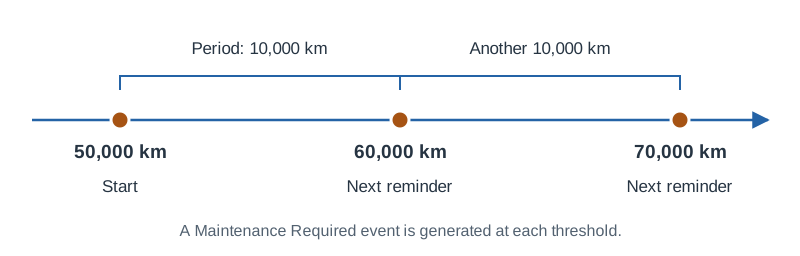
For a vehicle currently reporting an odometer below 50,000 km, choose Odometer, set Start to 50,000 km, and Period to 10,000 km. The thresholds are 50,000, 60,000, 70,000 km and so on. Enter equivalent values if your app displays miles.
The selected counter must be present and meaningful in incoming positions. Odometer normally comes from the device; Total Distance is the server's accumulated distance. Choose the counter appropriate for the vehicle and verify it in position data before relying on reminders.
Notifications and timing
Create a Maintenance Required notification for the relevant devices and recipients. An event being recorded does not by itself send email or push notifications.
Events are generated when consecutive positions cross a threshold. This also applies to time-based schedules: the device must report a new position for maintenance to be detected.
The schedule repeats automatically. After servicing the vehicle, adjust Start if the next reminder should use a different baseline.
Troubleshooting
If no event appears, check that the schedule is linked to the device, the selected value exists and increases across a threshold, and the period is positive. Missing or zero counter values can prevent detection. If an event exists but no message arrives, check the notification's device connections, recipients and channel configuration.