9.7.0 -> stopped working "continuous tracking off"


Screenshot?
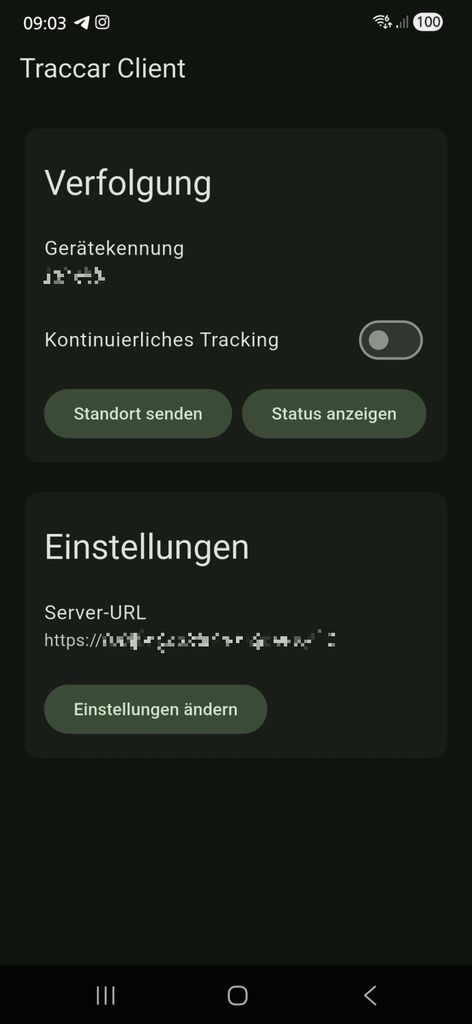

having similar issues myself, the continuous tracking switch never turns green, and the persistent notification never appears. worked fine before update, manual location updates work fine. stationary updates don't seem to work either.
Gustl, so if you enable it, does it work fine?
rose, nothing happens even if you move? Like 200+ meters?
Hello Anton,
Moving didn't seem to fix it, the location service fails to begin whatsoever. Downgrading to the previous release fixed my issues.
Have you double-checked all permissions? What about client logs?
Hi,
Yes, I've double checked perms. Logs showed a stationary check when I started the continuous tracking and then that the location service exits quickly afterwards. Switch for continuous tracking doesn't turn green, stays red. After downgrading behaviour is as expected, the service starts and the persistent notification appears. I did try quite a bit before downgrading, i.e. restarting my phone, clearing app data, resetting permissions, etc. but to no avail.
In case it's useful to you, my android version is:
Android 16
OneUI 8.0 (Samsung)
For me, it seems everything works fine after enabling "continuous tracking" again.
BTW: Is there a changelog for 9.7.0?
There's no explicit changelog, but you can find changes on GitHub.
I also field tested 9.7.0 on my Pixel 10 device and it works fine.

I have the same problem with "continuous tracking" disabling itself after updating to Traccar Client 9.7.0 .
Tracking on 2 Android phones seems to work fine after enabling the "continuous tracking" after the update, but 1 iPhone keeps disabling the "continuous tracking" by itself over and over again.
(How do I downgrade Traccar Client to temporarily work around the problem?)

I had the red switch problem sometimes before 9.7 but quitting and restarting Traccar always solved it.
But now Traccar's continuous tracking feature seems to be completely broken since 9.7 on Android 16 OneUI 8.0 on Samsung S23, also on my companys device, an S24.
If I try to switch on continuous tracking, the swich turns red and yells following log on the S23 (corrdinates replaced by X's):
01-18 12:43:33.244 DEBUG [DeviceSettings stopMonitoringPowerSaveChanges]
  O  Stop monitoring powersave changes
01-18 12:43:33.243 DEBUG [HttpService stopMonitoringConnectivityChanges]
  O  Stop monitoring connectivity changes
01-18 12:43:33.242 INFO [g c]
  O  Stop heartbeat
01-18 12:43:33.241 INFO [ActivityRecognitionService f]
  O  Stop motion-activity updates
01-18 12:43:33.240 DEBUG [TSGeofenceManager c]
  O  Stop monitoring geofences
01-18 12:43:33.239 DEBUG [TSGeofenceManager stopMonitoringStationaryRegion]
  O  Stop monitoring stationary region
01-18 12:43:31.482 DEBUG [TSLocationManagerActivity onDestroy] locationsettings
01-18 12:43:31.476 DEBUG [AbstractService onDestroy]
  O  GeofencingService stopped
01-18 12:43:31.475 DEBUG [AbstractService f]
  G  GeofencingService.stopSelfResult(1): true
01-18 12:43:31.472 DEBUG [AbstractService onDestroy]
  O  TrackingService stopped
01-18 12:43:31.459 DEBUG [AbstractService f]
  G  TrackingService.stopSelfResult(1): true
01-18 12:43:31.448 DEBUG [TSLocationManagerActivity a] locationsettings
01-18 12:43:31.404 INFO [BackgroundTaskManager$Task stop] ⏳ stopBackgroundTask: 2
01-18 12:43:31.400 DEBUG [t a]
  C  DESTROY: a9e6f539-eba0-441f-9587-62b5978bf765
01-18 12:43:31.399 INFO [HttpService$e onResponse]
  #  Response: 200
01-18 12:43:31.268 DEBUG [TSGeofenceManager startMonitoringStationaryRegion]
  ()  Start monitoring stationary region (radius: 150.0m XX.XXXXX,X.XXXXX hAcc=14.777)
01-18 12:43:31.268 DEBUG [AbstractService a]
  G   FINISH [GeofencingService startId: 1, eventCount: 0, sticky: false]
01-18 12:43:31.266 DEBUG [AbstractService a]
  ()  STATIONARY_GEOFENCE [GeofencingService  startId: 1, eventCount: 1]
01-18 12:43:31.266 DEBUG [GeofencingService b]
╔═════════════════════════════════════════════
║ Stationary EXIT distance evaluation
╠═════════════════════════════════════════════
╟─ distance=0.0m, accuracy=14.777m, radius=150.0m
╟─  I   Stationary=Location[fused XX.XXXXX,X.XXXXX hAcc=14.777 et=+1d19h35m29s104ms alt=XXX.50001525878906 vAcc=1.7395519]
╟─  I   Trigger=Location[fused XX.XXXXX,X.XXXXX hAcc=14.777 et=+1d19h35m29s104ms alt=XXX.50001525878906 vAcc=1.7395519]
╚═════════════════════════════════════════════
01-18 12:43:31.266 WARN [GeofencingService b]
  X Ignoring spurious stationary geofence EXIT
01-18 12:43:31.258 DEBUG [t first]
  C  Locked 1 records
01-18 12:43:31.258 INFO [HttpService a]
  #  HTTP POST: a9e6f539-eba0-441f-9587-62b5978bf765
01-18 12:43:31.257 INFO [BackgroundTaskManager$Task start] ⏳ startBackgroundTask: 2
01-18 12:43:31.252 DEBUG [AbstractService a]
  G   FINISH [TrackingService startId: 1, eventCount: 0, sticky: false]
01-18 12:43:31.251 DEBUG [AbstractService a]
  ()  motionchange [TrackingService  startId: 1, eventCount: 1]
01-18 12:43:31.251 INFO [TrackingService l]
╔═════════════════════════════════════════════
║ TrackingService motionchange: false
╠═════════════════════════════════════════════

01-18 12:43:31.250 INFO [HttpService flush]
╔═════════════════════════════════════════════
║ HTTP Service (count: 1)
╠═════════════════════════════════════════════

01-18 12:43:31.247 DEBUG [TSGeofenceManager startMonitoringStationaryRegion]
  ()  Start monitoring stationary region (radius: 150.0m XX.XXXXX,X.XXXXX hAcc=14.777)
01-18 12:43:31.243 INFO [t a]
  C  D INSERT: a9e6f539-eba0-441f-9587-62b5978bf765
01-18 12:43:31.241 INFO [TSLocationManager a]
╔═════════════════════════════════════════════
║ motionchange LocationResult: 2 (262878ms old)
╠═════════════════════════════════════════════
╟─  I  Location[fused XX.XXXXX,X.XXXXX hAcc=14.777 et=+1d19h35m29s104ms alt=XXX.50001525878906 vAcc=1.7395519], time: 1768736348363

01-18 12:43:31.241 INFO [TSLocationManager onSingleLocationResult]
  #  MOTIONCHANGE isMoving=false df=0.0 — resetting short-term filter state
01-18 12:43:31.241 INFO [TSLocationManager onSingleLocationResult]
  #  Acquired motionchange position, isMoving: false
01-18 12:43:31.231 DEBUG [HttpService a]
╔═════════════════════════════════════════════
║ iiiIII  Connectivity change: connected? true
╠═════════════════════════════════════════════

01-18 12:43:31.230 INFO [TrackingService a]
  #  setPace: false → false
01-18 12:43:31.229 INFO [g c]
  O  Stop heartbeat
01-18 12:43:31.226 DEBUG [DeviceSettings startMonitoringPowerSaveChanges]
  ()  Start monitoring powersave changes
01-18 12:43:31.226 INFO [ActivityRecognitionService d]
  ()  Start motion-activity updates
01-18 12:43:31.224 DEBUG [HttpService startMonitoringConnectivityChanges]
  ()  Start monitoring connectivity changes
01-18 12:43:31.223 DEBUG [TSGeofenceManager e] i  Persist monitored polygons: {}
01-18 12:43:31.222 INFO [TSGeofenceManager start]
  ()  Start monitoring geofences
01-18 12:43:31.222 DEBUG [TSGeofenceManager d] i  Persist monitored geofences: []
01-18 12:43:31.220 DEBUG [LocationAuthorization withBackgroundPermission]
  i  LocationAuthorization: Permission granted
01-18 12:43:29.074 DEBUG [TSSQLiteAppender destroyLog]
  #  Destroy log success
- A single HTTP request with the correct coordinate was initially sent with no subsequent requests coming.
- If I move and then repeating the toggling off/on or by clicking "send location", the same coordinate will be sent again once, no matter how far I move.
- For a unknown reason sometimes Traccar seems to pick up a new coordinate which is correctly initially but then gets stuck for a while
- Battery percentage is always correct when a request is sent even if the coordinates are stuck.
- Restarting the phone didn't help.
- I have to replace the emojis in the log because your traccar forum db seems to not support these characters "Incorrect string value: ... for column 'content' at row 1" ---- O = red circle, # = blue circle, C = check mark, D = diskette, i = Information, X = no/error, () = racket, G = gear, I = pin
Just to be clear, red switch color means that the app thinks you're stationary. I recommend reading this guide on how it works:
https://github.com/transistorsoft/flutter_background_geolocation/wiki/Philosophy-of-Operation
This is the same behaviour I was experiencing. I'm unsure if the app just thought I was stationary, as no notification appeared showing the location service was active.
The red switch feels a little misleading, to me it was indicating something went wrong rather than the app just thinking I'm stationary. Maybe some documentation regarding this within the app could help?
Either way, when the app was like this the stationary heartbeat setting was not respected, and the client didn't send any updates until I downgraded.
We had the same red color in older version, so it's not some thing new.
How frequent was your heartbeat set?
Hi, just wanted to say, with the update to 9.7.0 the option "continuous tracking" was disabled by itself(?) and devices went offline... Was seen on multiple devices.
Android-phones (v16).