Active Maps Attribute - Server setting


Setting account preferences as admin doesn't affect other users. It sounds like what you want is to set server settings instead, which are global.
That is why I said I set server attribute Active Maps to have the same list as admin has, but instead of propogating that list to all users it changes all users to only have OpenStreetMap which wasn't even their default setting on their account.
Either you didn't set it correctly or the user has their own preferences set to something else.
Users don't have the option to set their own preferences, perhaps because all users were created by admin and not a lower level manager.
On server settings I simply added the Active Maps attribute and then typed in the comma seperated list of maps as defined in the OP. Then saved the settings. If that is not the right way, what is?
Please provide screenshots of both server attribute and the user attribute (the one that's not working correctly).
User attribute Active Maps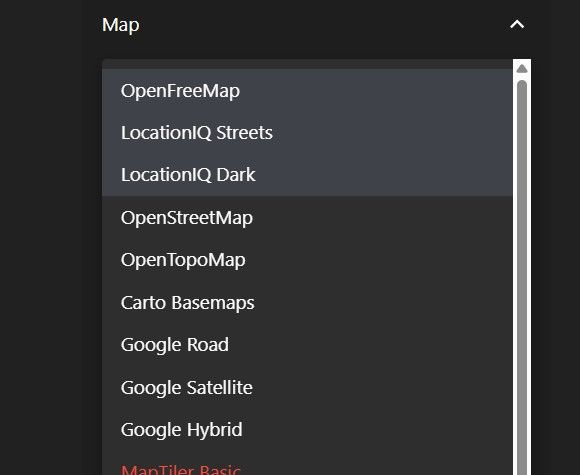
Users only option when viewing map - noting that it is not even one of the options set in users Active Maps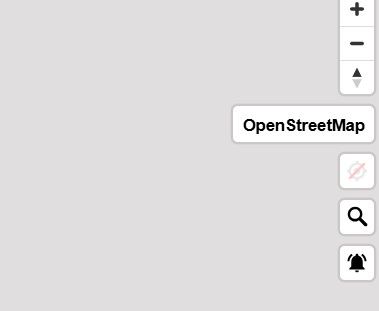
Server attribute Active Maps which is copied from admin user attribute of Active Maps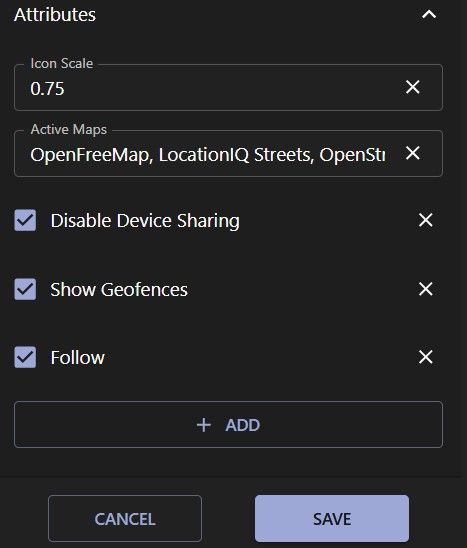
Admin choice when viewing maps - which matches admin setting for Active Maps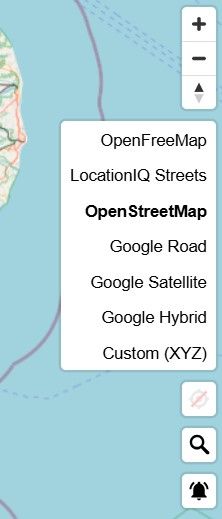
Note if I delete the Server attribute for Active Maps the users choice when viewing the map goes back to matching the user attribute setting. shown
Your attribute value is incorrect. The list should include map ids, not localized titles.
So how do I find the map ids or is it simply the index from the available map list. i.e. 1, 2, 4, 7, 8, 9, 26
The standard recommendation is to set your user preferences and then just copy values from the account attributes to server attributes.
When viewing the map as admin I can choose to select any of the maps defined in Preferences, Active Maps, which I have selected: OpenFreeMap, LocationIQ Streets, OpenStreetMap, Google Road, Google Satellite, Google Hybrid, Custom (XYZ)
However when using the map as a general user I only have access to: OpenFreeMap, LocationIQ Streets, LocationIQ Dark.
As admin I then add server attribute Active Maps with the same list of maps as admin users Active maps, in the hope that will give all users access to the same map selection. However the general user now only has OpenStreetMap, even though their account default is LocationIQ Streets !
The admin user map choice is unaffected.
How do I give all users the same choice of maps as admin, as the way I thought I should do it doesn't work?