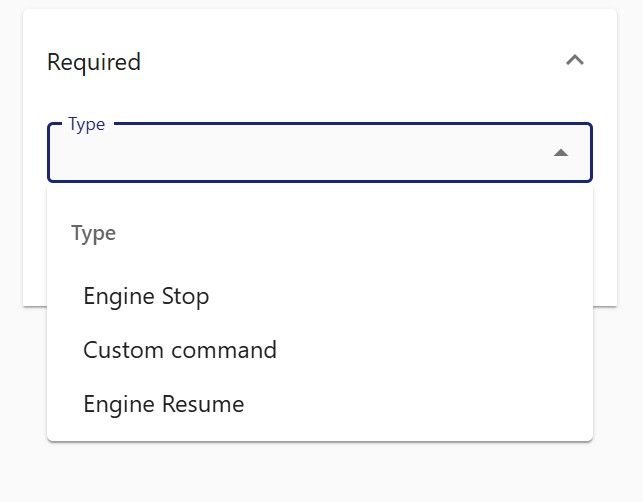
can not send command to device


Have you enabled UI: Disable Saved Commands attribute under Settings -> Server or under the respective user in Settings -> User?

If you saved a command that is not supported for the protocol, it won't show there.
I have now created a custom command instead of a predefined one, which can now be selected in the dropdown menu.
Is it true that only custom commands can be defined as saved commands?
No, it's not. Only supported commands can be defined as saved. But for most commands it makes absolutely no sense to save them. What are you saving exactly if a command doesn't have any parameters?
I would like to make the existing command “get modem status” or “get device status” selectable in the device's context menu.
Just like “Engine stop” is already available.
A custom command for turning DOUT1 on/off on the FMC920 works.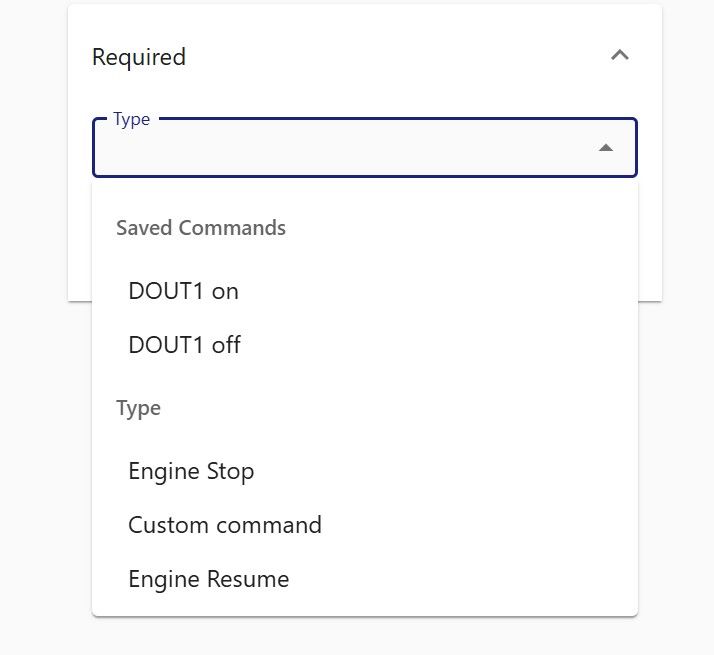
I think you completely misunderstood what saved commands do. They won't suddenly make unsupported commands work, obviously.
Saved commands are there to save parameters, so that you don't need to re-enter it every time. They won't magically make a command type supported if it's not supported.

All my commands are saved commands and all my commands work as intended, even those not enabled by default.
I had to do this, because most of the commands supported by my devices don't even show on traccar, and those that do show, don't work at all.
It doesn't work like that. You're mistaken.
Well, maybe my server and/or devices are the ones mistaken because I use it like that since forever.
And around 1 year ago I replaced all my devices and had to rewrite all the commands and they are all working.
All of your commands are custom commands, not other types. So this statement you made was incorrect:
even those not enabled by default
You did not magically enabled unsupported commands using saved commands. You just re-implemented same commands using custom command. That is a valid solution, but that's not what we're talking.
If traccar supports a command, then why is not enabling it on a device?
If traccar is not enabling a command, then it does'nt support it on that device.
Otherwise is not working correctly.
So, since there's certain devices that are same device but different brand (chinese) altough using the same protocol and instruction or commands set, traccar server enables diferent commans on each of them.
Then while a device has a certain set of commands that I know traccar handles, but does not enable on all devices, some times for a diferent model version, some times for a diferent brand same device model, I can write a command not enabled by default on one device (but enabled on others) and another command not enabled by default in a diferent device (but enabled on others).
All of this devices, use the same protocol, command set, instructions set and SMS command format and functions, just have minor diferences that traccar handles like very diferent devices or just, very poorly.
Also on other thread you said commands can only be sent using the protocol format, which also is not true.
Because for some of the devices, commands are saved "as is" like the command sent using SMS directly to the device. (alarm,off#)
For some other devices, the "as is" command is saved after hex encoding it. (616c61726d2c6f666623)
And both give the same ressult on the corresponding device.
If Traccar supported the commands, then those commands should'nt be written and saved by me, they would have existed and be available somewhere before, but they didn't.
Also, the commands available for those devices DONT WORK.
So I have to limit user's access to commands and enable them one by one, user by user.
And as far as I can find, those I use, are "saved commands" like traccar clearly says in the image, because also, there's no refference to them anywhere else.
https://i.imgur.com/Eh6ddoW.jpeg
None of these commands do anything (on any device) "custom command" used to work and now is also a useless container, only returns java error.
https://i.imgur.com/opup6sj.jpeg

(The same way the forums instructs to use markdown syntax but images won't be shown using it)
We have a very large number of different protocols. The set of supported standard commands depends on the protocol and many protocols only support custom commands. When you try to create a saved command, it shows you the full list of types because it doesn't know what device you will link it to. But it doesn't mean it will work. This is what we're discussing here.
As for the markdown, it's funny because what you tried is NOT a markdown format:
[img]https://i.imgur.com/Eh6ddoW.jpeg[/img]
You can find the markdown format if you follow the link. But even then, for it to work, the link should be to an image, not a website, like in your case.
No, I cut the wrong link, but I also tested markdown in past images and don't show either.
[Imgur](https://imgur.com/Eh6ddoW)
[img]https://i.imgur.com/Eh6ddoW.jpeg[/img]
It seems someone at imgur drank too much, I need to make a hybrid from what they gave me.

Hello, I have read many messages here, but I am still unable to resolve the issue. I have created saved commands and connected them to the device and the user. However, this command is not displayed in the device's drop-down menu. What else can I do to resolve the issue? Thank you in advance for your assistance.