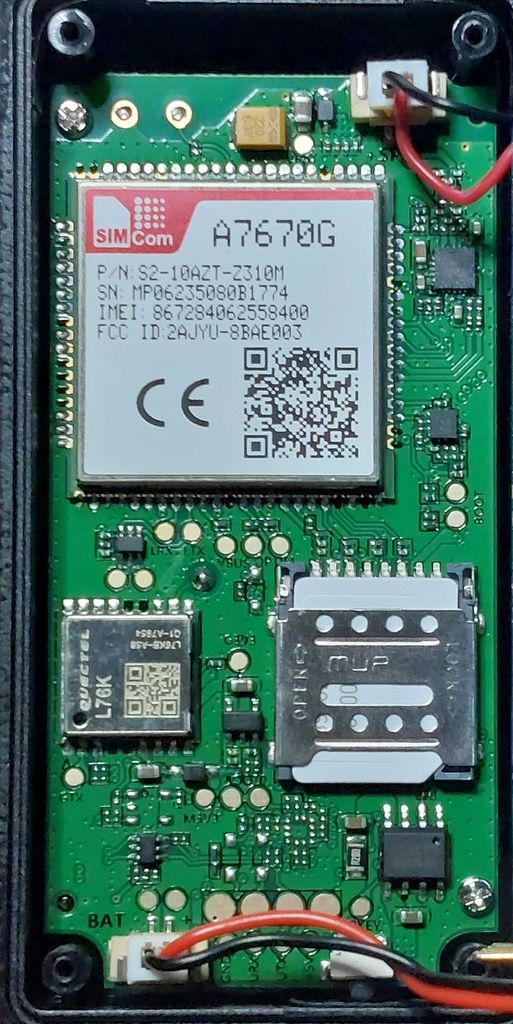
Configure PAJ PET Finder 4G for Traccar


@Klaus,
thanks. Yes my device looks exactly like the one in the picture. I put the SIM into a phone, i was able to receive SMS, but not send ones. It booked into o2 network.
What am i doing wrong?
Thanks and best regards
Thomas
@Thomas,
I would first test the finder with a "normal" SIM card. For me, prepaid SIM cards for the 900 MHz band (D1/D2) worked best; I always had problems with o2. After inserting the SIM card, the finder needs up to 15 minutes to register on the network. The problem is that the finder goes into standby mode after 3 minutes if it's not moved. The PAJ service suggested taking the finder for a 15-minute walk and moving it around. Okay, I have a dog, so I attach the device to its collar, and it runs around the garden for 15 minutes. After 15 minutes at the latest, the blue and yellow LEDs should be constantly lit. If not, then the finder is probably defective.
Ok... is this registering 15 minutes topic only after first insert of the SIM? Or do I have this everytime I want to use the device?
Only the first time after changing the sim
Here's a quick guide to registering a PAJ Easy Finder 4G with the included Tele2 IoT SIM on the Traccar demo server:
1. Check the SIM:
Turn on the finder and place it outdoors or near a window. Wait about 2 minutes and then check the yellow LED:
If the LED is lit continuously, the SIM is activated and ready for use.
2. Change the server IP address to the Traccar demo server:
Insert a standard SIM (whose phone number you know) into the finder and send ONLY this SMS:
'IP 188.245.151.94 5013' [SET OK]
You can also optionally change the password.
IMPORTANT: Do not change the APN or other settings!
3. Reinsert the Tele2 IoT SIM card into the finder.
Now you can register your finder on the Traccar demo server.
If it doesn't work immediately, turn the finder off and then back on after a short wait.
Now you can use the finder with the PAJ SIM until they notice and block the SIM.

Hello,
Thank you very much for your efforts so far. I’ve been following this thread with great interest for some time now. I myself have PAJ Allround Finder 2.0 and Allround Finder 4G 2.0. I’m completely confused because, ever since this thread was created, it’s been about so many different PAJ trackers: Pet Finder, Allround Finder, Easy Finder, Compact Finder...
Has anyone followed up on the idea of routing the PAJ Allround Finder to a self-hosted server? As far as I understand, this fails because of the password protection of the devices?
My Finders can be controlled via text message, but they don’t send me any feedback. Only the “CQ” command works and restarts the tracker.
What confuses me is that I get absolutely no response via text message. Do the Allround Finders only respond via the serial port?
Some of you already have experience with these trackers. Have you made any progress on this?
Same with my PAJ Compact Finder 4G
I tried the included Movistar Sim
I tried my own sim
I tried a 1nce sim.
The PAJ Compact Finder does not send answers back to me.
I tried out Klaus's instructions. None of my Finders, including the Compact Finder, are sending me any responses.
For the finder to send a reply via SMS
- the SIM card must be activated;
- SMS sending must be enabled on the SIM card (this is NOT the case with the Tele2 IoT SIM cards used from PAJ);
- the correct SMSC must be entered on the SIM card;
- sufficient credit must be available for prepaid SIM cards.
- The SMS to which the finder wishes to reply must send its phone number in international format (+49 152...).
Therefore, my recommendation is to test it with a standard SIM card intended for phones. With these SIM cards, points 2 and 3 are already met.
Furthermore, some GSM providers block incoming SMS messages from M2M numbers, e.g., Telekom DE.
Another option is as follows: Wait until the finder goes into standby mode (all LEDs off).
Then send an SMS to the finder with the text G123456#. If the finder wakes up from standby mode (LEDs blinking/lit continuously), the SMS has been received.
Thanks for the tips. I can wake the tracker from standby by sending it a text message. However, I still don't get any response from the tracker to my text commands. So I don't know if the tracker accepted them. I'll keep trying and will also get a SIM card from a different provider.
@schntz:
That's already good.
Now test whether the finder replies to your SMS:
- if a prepaid card is inserted in the finder: note the balance of the card;
- if a SIM card with a contract is inserted in the finder: activate itemized billing.
Then resend an SMS to the finder with the text G123456#.
After that, check if the prepaid balance on the SIM card in the finder has changed, or check the itemized billing statement to see if an SMS to your mobile phone has been charged.
You may have to wait up to 24 hours for the SMS to be recorded and billed.
@schntz
I see you have a Compact Finder. It has a USB-C interface through which you can send AT commands. This works with a Linux PC or a Windows PC. It's well described in this topic . So you can send a SMS via USB. Use an USB-Data-Cable.
On Linux:
- Open gtkterm or another TTY terminal
- Set port: /dev/ttyUSB2 and Echo: on
- Test it with
AT+ ENTER, it returns 'OK' - Set SMS mode to Text:
AT+CMGF=1+ ENTER, it returns 'OK' - Send SMS:
AT+CMGS="+49152xxxxxx"
it displays '>' and you can type any text, e.g. Hello - and end the entry with
CTRL+Z.
The SMS will then be sent to your phone number "+49152xxxxxx".
If everything goes well, you'll see an OK message.
Don't be confused: log texts starting with '+' will be displayed occasionally.
You can find an overview of all AT commands here:
https://www.simcom.com/product/A7600C-L1.html?utm_source=everythingRF
Search for 'A76XX Series MQTT_EX_AT Command Manual'
@Klaus
Thank you very much for the helpful tips. I was able to control the Compact Finder via the serial port and send it SMS. The SMS commands you posted worked. I’m finally getting responses via text message, too. Are there any other commands like these that can be used to change the tracker’s settings? Do you know if the tracker can only be controlled via text message commands, or if it can also be accessed through the data channel?
@Thomas:
a flashing LED indicates that the device cannot connect to any network.
Put the SIM into a Phone:
Does your device look like this?