Somewhere after version 6.8 it seems that new Custom Attributes can't be named starting with a capital letter.
Can I confirm this was a conscious decision so that attributes all use camel case?
I'll briefly explain why this is annoying. We use custom attributes to for various things, and the main example would be how we track the state of our immobiliser in the Popup info. The Popup always uses the attribute name, not the attribute description. We created one for Immobiliser Status some time ago (works great by the way), and it allowed capitalisation so it looks clean.
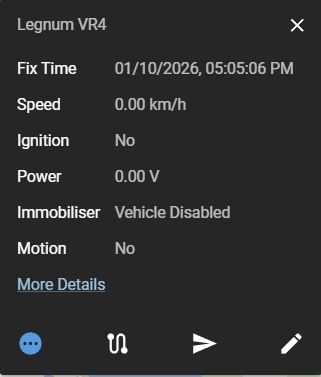
Now, we also just created a new computed attribute called "Triggering Event", which we wish to be able to add to the Popup as "Trigger", so that customers can see what caused the GPS tracker to send a record outside of normal data acquisition frequencies. Unfortunately, 6.11.1 will let me create the attribute with the uppercase name, but then immediately removes the capitalisation.
Here is some of the JEXL for the "Trigger" computed attribute. Note that we used to just overwrite "Event" but it stopped the implicit teltonika Power Cut alarm from working:
event != null ?
(event == "0" ? null :
event == "239" ? "Ignition State Changed" :
event == "240" ? "Movement State Changed" :
event == "380" ? "Output 3 Changed" :
event == "78" ? "Token Detected" :
event == "381" ? "Input 2 Changed" :
event == "2" ? "Input 2 Changed" :
event == "1" ? "Input 1 Changed" :
event == "237" ? "Network Type Changed" :
event == "263" ? "Bluetooth status Changed" :
event == "253" ? "Harsh Driving Event" :
event == "252" ? "Power Disconnected" :
event == "318" ? "GPS Jamming Detected" :
event == "249" ? "4G Jamming Detected" :
event == "1474" ? "Beacon Presence Changed" :
event == "20012" ? "MAG Tampering Detected" : event)
: null
I am aware of course that I can just create a new custom attribute for the Power Cut alarm and assess it as follows:
event == "Power Disconnected" ? "powerCut") : null
We're happy to put in our own customisation to "fix" this (which I suspect many would not agree with) by removing the capitalisation, but I'm mostly interested if this change was intentional.
Alright I'll capture some video and link it here.
Never mind, it's just the GUI behaviour that keeps on catching me out.
When creating an attribute you have to name it and then also click the "Add <attribute>" drop down that appears when you do it.
This gets me every few months.


Somewhere after version 6.8 it seems that new Custom Attributes can't be named starting with a capital letter.
Can I confirm this was a conscious decision so that attributes all use camel case?
I'll briefly explain why this is annoying. We use custom attributes to for various things, and the main example would be how we track the state of our immobiliser in the Popup info. The Popup always uses the attribute name, not the attribute description. We created one for Immobiliser Status some time ago (works great by the way), and it allowed capitalisation so it looks clean.
Now, we also just created a new computed attribute called "Triggering Event", which we wish to be able to add to the Popup as "Trigger", so that customers can see what caused the GPS tracker to send a record outside of normal data acquisition frequencies. Unfortunately, 6.11.1 will let me create the attribute with the uppercase name, but then immediately removes the capitalisation.
Here is some of the JEXL for the "Trigger" computed attribute. Note that we used to just overwrite "Event" but it stopped the implicit teltonika Power Cut alarm from working:
I am aware of course that I can just create a new custom attribute for the Power Cut alarm and assess it as follows:
We're happy to put in our own customisation to "fix" this (which I suspect many would not agree with) by removing the capitalisation, but I'm mostly interested if this change was intentional.