Determine calculated attributes


Why are you trying to use computed attributes? Do understand what they are for?
Hola Anton, first of all, thank you for responding. I greatly admire your work with this platform. From what I understood, these are used to calculate other variables related to the values that the tracker provides me. Is that correct? My issue is that I see, for example, that in the case of Teltonika, the field names seem to be defined and can be used. I don't know how I could determine the name of the variable that the tracker is giving me.
Another factor that I did not explain is that the fuel attribute of the platform does not detect my sensor. I suspect it is due to some compatibility issue with my tracker's protocol. That's why I am resorting to calculated attributes.
You should first check what the device is reporting and if there's a value there that you're looking for.
I already did that, and there is a value that I want to use. How could I reference it to include it in my mathematical expression?
Screenshot?
I don't have a current trace of the device because I have already left the office; I didn't expect such a quick response. However, if I provide you with a screenshot of the structure of the logs that my tracker sends, the values are displayed as 0 because it was the first time I connected it, but that would be its structure of the logs. It is the one in ASCII.
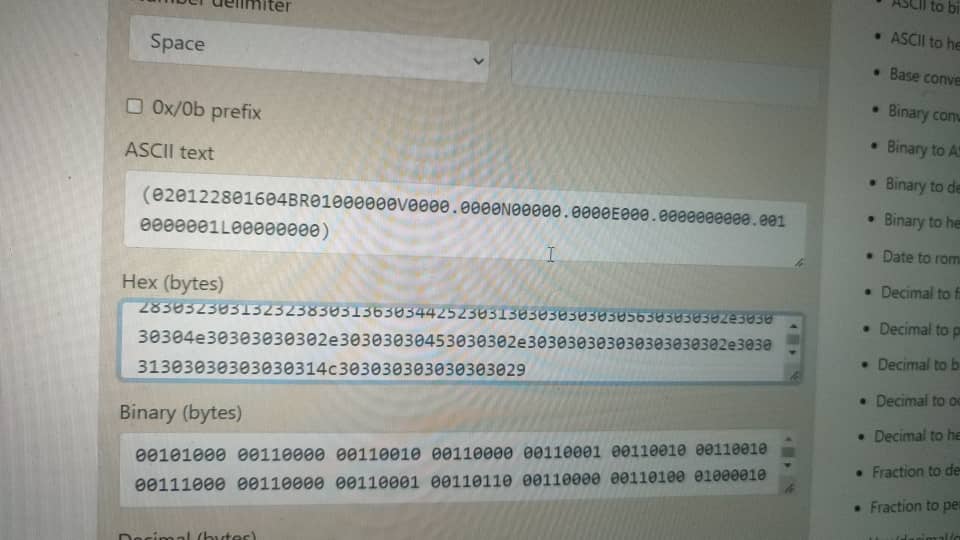
I'm talking about the decoded data. Please provide a screenshot for the position details screen.
I'm sorry, Anton. I thought what I provided was already the decoded values. Can you clarify exactly what you need? I apologize for my lack of knowledge.
I see that many times the term 'io30' is used to refer to a field, but I don't know where that is determined.
If the value is decoded as 'io30', then that's what you should be using in the expression.
No, no, I mentioned that as an example I've seen in several forums; it's not my case. What I meant is that I wanted to get to that point because, as you can see in the screenshot I provided, when I decode it, it only gives me the value, there's no field name or anything like that.
Once again, you should just look at the web app and see what you get.
How can I see the decodified data what you mean???
Hi all, I am relatively new to the platform, I am using a TK666, and I am connecting to its RS485 ports a fuel sensor, and I intend to determine its value through the calculated attributes. I can decode well the log that sends this tracker to the server, but I do not know how to use the variables that he throws me, if someone can help me would be of great help. Thanks for reading