Fails email notification


Your configuration is invalid. Why did you add extra spaces everywhere?
I'm sorry this is the current configuration
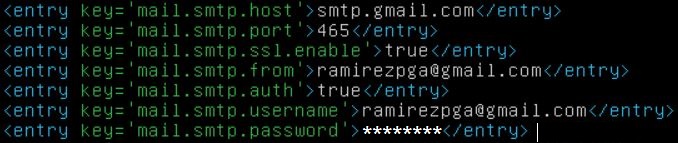
You need to remove attributes from user and server settings. Just leave the config.
Sorry,
Now I have this message
Could not connect to SMTP host: smtp.gmail.com, port: 465, response: -1 - MessagingException (... < NotificationMail: 120 < NotificationResource: 61 < ...)
Now enable the port on the server and access to less secure applications in gmail. What could be the problem?
I think the error is pretty self-explanatory.
I solved the problem,
reinstall traccar and place all the configuration in the xml file
Thanks a lot..!
Hi,
In version 3.15 configure traccar.xml like this
<entry key = 'mail.smtp.host'> smtp.gmail.com </ entry>
<entry key = 'mail.smtp.port'> 465 </ entry>
<entry key = 'mail.smtp.ssl.enable'> true </ entry>
<entry key = 'mail.smtp.from'> email@gmail.com </ entry>
<entry key = 'mail.smtp.auth'> true </ entry>
<entry key = 'mail.smtp.username'> email@gmail.com </ entry>
<entry key = 'mail.smtp.password'> pass </ entry>
I get this message
The configuration is correct?
There is a problem with boolean values. I need to add them as string attributes manually. Can someone please explain how to fix that..