Latest Traccar Client version does not update real location Android OS


Can you please provide support for your claims that it's unreliable. I have seen a few reports, but vast majority are from users without proper Google Play services.
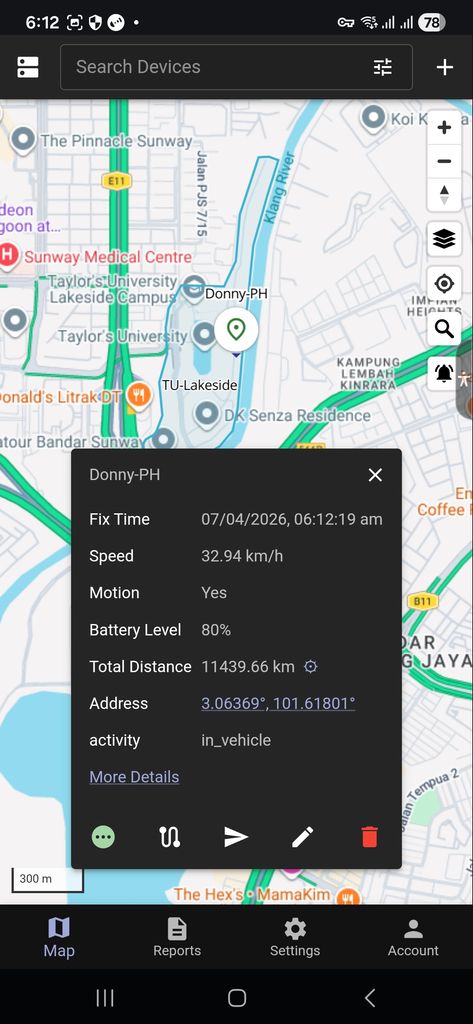
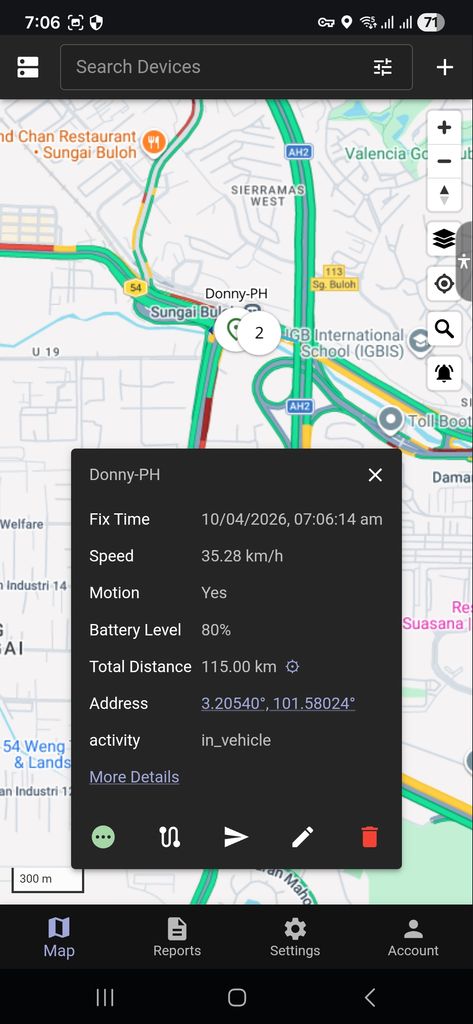
As we can see the Traccar client android refuse to update it's real time location. Fix Time is the latest. Speed shows active moving. Motion is yes. Activity shows in_vehicle. But no updates on the address coordinates. What could be the bugs?
I tried repeating the random command send but it does not work today.
I was referring specifically to this part:
as reported by many users
Extremely strong statement like that require some supporting evidence.
Okay as I am now reporting actively and troubleshooting for a possible bugs.
The Traccar Client suddently updates the latest real time location coordinates.
I need to find a way to retrieve the logs at the Traccar client for your analysis.
It serms like a delayed respond after 30 minutes since movements is constantly detected.
Can it be any of the Traccar client config settings? Set to the Highest all the time.
Thanks for the follow up Anton.
One thing to note is that my son never want to keep his google credentials sign in all the time as he afraid of hackers attacks.
As for my phone. I have my google credential sign in all the time. Which clearly shows my phone does not suffer intermittent location update failure like his phone.
Could this be the reasons why for the fault encountered in his phone on the halted location updating issue?
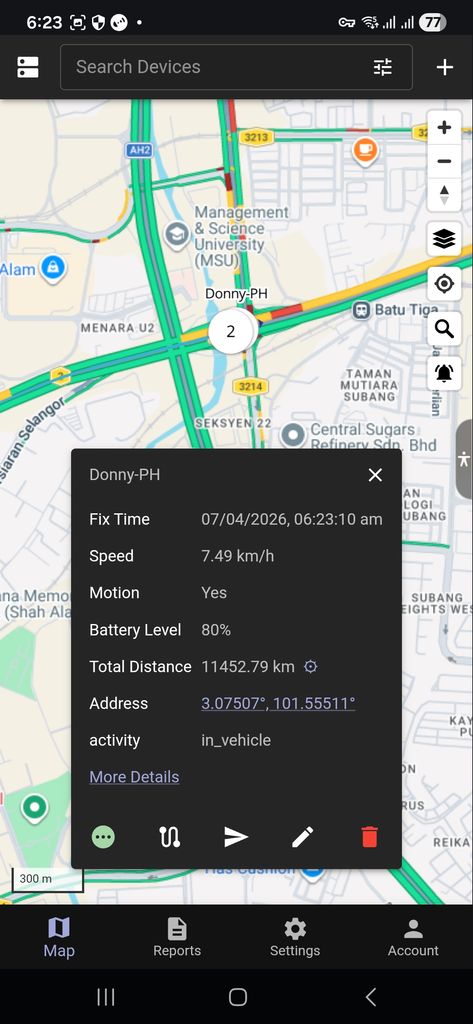
Here my son when for his lunch and the Traccar client location frozen and stop updating only the real time coordinates. But the fix time still updates as usual.
Here is the full initialized sequence of the start of remote command to the Traccar client which refused to update to latest real time GPS coordinates for your analysis Anton.
Many Thanks.
There seems to be an error .... Error when posting to this thread ...
"Incorrect string value: '\xF0\x9F\x94\xB5 ...' for column 'content' at row 1"
P/S: Had to remove all the little cute icon images which the forum blocks earlier with error ...
Sniplet of the Traccar Client Log under analysis ...
04-07 19:25:34.878 INFO [TSLocationManager onSingleLocationResult]
    Acquired current position
04-07 19:25:34.876 DEBUG [SingleLocationRequest trySatisfyLastLocation]
 age: 119682ms
 maximumAge: 0
 desiredAccuracy: 150.0
 meetsAccuracy: true
 meetsStaleness: true

04-07 19:25:34.868 DEBUG [EventManager c]    heartbeat
04-07 19:25:34.837 DEBUG [n a]
04-07 19:25:34.833 INFO [ScheduleEvent a]

  OneShot event fired: TERMINATE_EVENT


04-07 19:25:34.833 DEBUG [TerminateEvent$a onChange]
    TERMINATE_EVENT ignored (MainActivity is still active).
04-07 19:25:34.829 INFO [TSScheduleManager oneShot]
   Scheduled OneShot: HEARTBEAT in 60000ms (jobID: -1307475748)
04-07 19:25:34.826 INFO [ScheduleEvent a]

  OneShot event fired: HEARTBEAT


04-07 19:25:17.975 DEBUG [LifecycleManager h]    onStop
04-07 19:25:17.974 DEBUG [LifecycleManager e]   onPause
04-07 19:25:17.309 INFO [TSScheduleManager oneShot]
   Scheduled OneShot: TERMINATE_EVENT in 10000ms (jobID: -1708771588)
04-07 19:25:17.306 DEBUG [LifecycleManager d]  onWindowFocusChanged: false
04-07 19:25:16.890 DEBUG [LifecycleManager d]  onWindowFocusChanged: true
04-07 19:25:16.784 DEBUG [LifecycleManager f]   onResume
04-07 19:25:16.779 DEBUG [LifecycleManager g]   onStart
04-07 19:24:17.160 DEBUG [TerminateEvent$a onChange]
    TERMINATE_EVENT ignored (MainActivity is still active).
04-07 19:24:17.159 INFO [ScheduleEvent a]

  OneShot event fired: TERMINATE_EVENT


04-07 19:24:09.435 DEBUG [LifecycleManager h]    onStop
04-07 19:24:07.732 DEBUG [LifecycleManager e]   onPause
04-07 19:24:07.148 INFO [TSScheduleManager oneShot]
   Scheduled OneShot: TERMINATE_EVENT in 10000ms (jobID: -1708771588)
04-07 19:24:07.147 DEBUG [LifecycleManager d]  onWindowFocusChanged: false
04-07 19:23:56.896 INFO [TSScheduleManager cancelOneShot]
   Cancel OneShot: TERMINATE_EVENT
04-07 19:23:56.895 DEBUG [LifecycleManager d]  onWindowFocusChanged: true
04-07 19:23:56.886 DEBUG [TSLocationManagerActivity onDestroy] locationsettings
04-07 19:23:56.862 DEBUG [AbstractService onDestroy]
    ActivityRecognitionService stopped
04-07 19:23:56.852 INFO [TSScheduleManager oneShot]
   Scheduled OneShot: TERMINATE_EVENT in 10000ms (jobID: -1708771588)
04-07 19:23:56.851 DEBUG [AbstractService f]
    ActivityRecognitionService.stopSelfResult(1): true
04-07 19:23:56.851 DEBUG [LifecycleManager d]  onWindowFocusChanged: false
04-07 19:23:56.844 DEBUG [AbstractService onDestroy]
    TrackingService stopped
04-07 19:23:56.822 DEBUG [AbstractService f]
    TrackingService.stopSelfResult(1): true
04-07 19:23:56.808 DEBUG [TSLocationManagerActivity a] locationsettings
04-07 19:23:56.639 DEBUG [AbstractService a]
    FINISH [ActivityRecognitionService startId: 1, eventCount: 0, sticky: false]
04-07 19:23:56.638 DEBUG [AbstractService a]
    start [ActivityRecognitionService  startId: 1, eventCount: 1]
04-07 19:23:56.638 DEBUG [ActivityRecognitionService a]
   ️DetectedActivity [type=STILL, confidence=100]
04-07 19:23:56.613 DEBUG [AbstractService a]
    FINISH [TrackingService startId: 1, eventCount: 0, sticky: false]
04-07 19:23:56.611 DEBUG [AbstractService a]
    motionchange [TrackingService  startId: 1, eventCount: 1]
04-07 19:23:56.611 INFO [TrackingService l]

 TrackingService motionchange: false


04-07 19:23:56.598 INFO [HttpService flush]
 HTTP Service (count: 0)

04-07 19:23:56.596 DEBUG [TSGeofenceManager startMonitoringStationaryRegion]
    Continue monitoring stationary region (radius: 150m 3.0236245,101.4397692 hAcc=14.915)
04-07 19:23:56.594 DEBUG [EventManager c]    location
04-07 19:23:56.594 DEBUG [EventManager c]    motionchange
04-07 19:23:56.592 INFO [TSLocationManager a]

 motionchange LocationResult: 44 (21398ms old)
  Location[fused 3.069565,101.488469 hAcc=14.915 et=+19h14m43s119ms alt=5.400000095367432 vAcc=1.0 vel=0.09754546 sAcc=1.5 {Bundle[{persist=false}]}], time: 1775561015194

04-07 19:23:56.592 INFO [TSLocationManager onSingleLocationResult]
  MOTIONCHANGE isMoving=false df=0.0 — resetting short-term filter state
04-07 19:23:56.592 INFO [TSLocationManager onSingleLocationResult]
  Acquired motionchange position, isMoving: false
04-07 19:23:56.591 DEBUG [SingleLocationRequest trySatisfyLastLocation]
 age: 21397ms
 maximumAge: 30000
 desiredAccuracy: 20.0
 meetsAccuracy: true
 meetsStaleness: true

04-07 19:23:56.575 INFO [TSScheduleManager oneShot]
   Scheduled OneShot: HEARTBEAT in 60000ms (jobID: -1307475748)
04-07 19:23:56.574 INFO [TSScheduleManager cancelOneShot]
   Cancel OneShot: HEARTBEAT
04-07 19:23:56.573 DEBUG [DeviceSettings startMonitoringPowerSaveChanges]
    Start monitoring powersave changes
04-07 19:23:56.573 INFO [ActivityRecognitionService d]
    Start motion-activity updates
04-07 19:23:56.573 INFO [n b]
    Start heartbeat (60.0s)
04-07 19:23:56.572 DEBUG [HttpService startMonitoringConnectivityChanges]
    Start monitoring connectivity changes
04-07 19:23:56.567 DEBUG [LocationAuthorization withBackgroundPermission]
    LocationAuthorization: Permission granted
04-07 19:23:50.496 DEBUG [TSSQLiteAppender destroyLog]
    Destroy log success
I think with "Force Full GNSS Measurements" Enabled via Developers Mode the Traccar Client location update is locked up from receiving real time updates. Could this be the actual cause? Lets disable it and see the out come later.
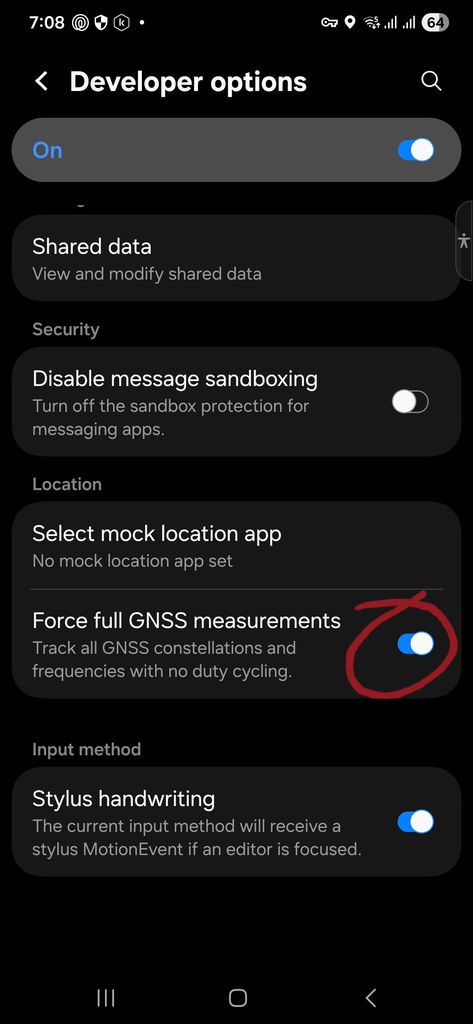
Maybe for Traccar client with Highest Location Accuracy should bypass Google physical activity checks and un-fuse forced location updates always base on user admin preferences.
After which I had run out of troubleshooting ideas. I decide to delete the old Traccar Cliend ID profile and cre-reate a new one.
Then soon after it appear tracking real time again. I suspected the problem is at the Traccar Server bugs now all along.
I try a work about and it seems to work. Once the coordinates fails to update real time.
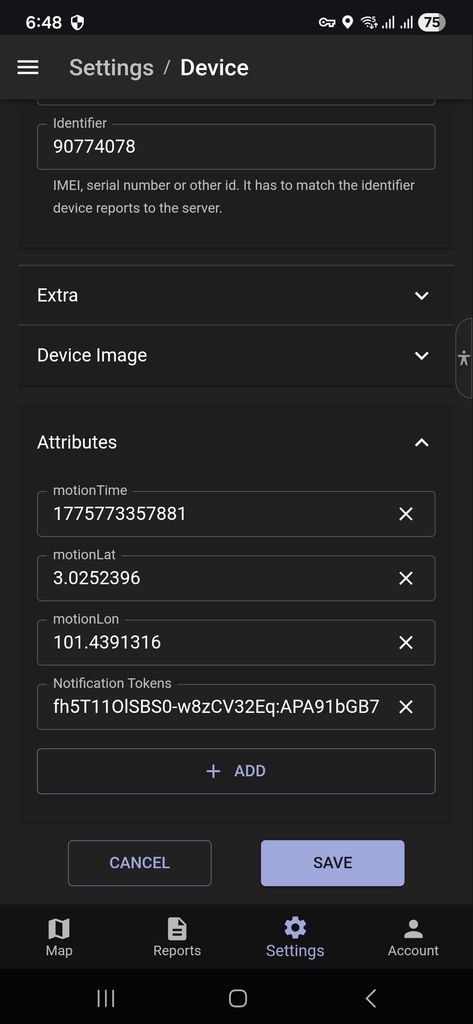
I had to delete the effected client Attributes, Notification Tokens at Traccar server.
Then at the Traccar client click on the Send Location follow by Continous Tracking check button to update to Traccar server.
So that at client Settings, Commamd will appear all Single, Periodic, Stop Reporting options plus Factory Reset option.
I think this mehod seems to solves the intermittent freezed coordinate real time updates.
Till then, lets cross our fingers.
Thanks anyway Anton.
Well the Traccar client not updating the location bugs still persists and many users have complained. I am glad it is not my isolated case only. Well I have ran of ideas how to troubleshoot further. I shall rest my case here until a bug fix is made available in future. Thanks Anton. Bye. Shall not disturb you further.
Quote ... https://www.traccar.org/forums/topic/traccar-does-not-automatically-send-the-location/
UnQuote ...
Question and Answers from you Anton.
Have you checked logs?
Yes, location update is real time updated but coordinates not updated at map tracking.Is the state stationary?
No, in motion Yes and activity in_vehicle.Thanks for the update.
You are most welcome Anton.There might be some delay for notifications on Google's side.
Notification Token updated to latest at Traccar server already.Can you please provide support for your claims that it's unreliable. I have seen a few reports, but vast majority are from users without proper Google Play services.
All our devices are flagship Samsung phones with Google Play with full permission and Activity attributes in Traccar servers exhibit real time value changes.
Questions? Does does Google Play services relates to Traccar client location real time updates intermittent failure? Traccar client setting is set to the Highest already.
Maybe you could enable an option for user admin to ignore Google physical activity integration features since it is so unreliable and unpredictable as reported by many users and adopt the simple send interval timer as preset by administrator user.
Which will follow the old legacy Traccar client failed proof system design. Cause as we move forward towards your development improvements we want to constantly use your latest Traccar client versions.