Mobile App OpenID Redirect URI Incompatible with Azure AD


I may be able to set up a repo environment, what would you need to perform the debugging?
I need the Open ID configuration.
I have set up a repro environment for you. Let me know how to share the details offline.
You can email support.
I have tested it locally and here's the error:
{
   "error":"invalid_client",
   "error_description":"AADSTS700025: Client is public so neither 'client_assertion' nor 'client_secret' should be presented. Trace ID: 6f510ca5-e71e-4ece-b04a-da097a954d00 Correlation ID: 71118f33-9fa4-4320-8910-75019ca8b2e2 Timestamp: 2026-02-14 05:21:39Z",
   "error_codes":[
      700025
   ],
   "timestamp":"2026-02-14 05:21:39Z",
   "trace_id":"6f510ca5-e71e-4ece-b04a-da097a954d00",
   "correlation_id":"71118f33-9fa4-4320-8910-75019ca8b2e2"
}
ChatGPT says that it means Azure is misconfigured. The client should be configured as confidential, not public.
Yes, here's the critical difference.
When you are in Entra ID and want to add a Redirect URI, one of the options is "Mobile and Desktop Applications" which seems like the right choice for Traccar Manager, the mobile application. This results the configuration shown here and the issue reported in this thread:
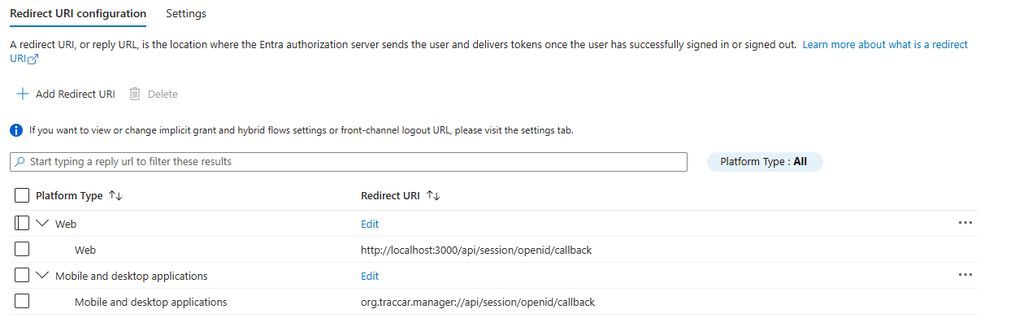
However, As Anton notes, it appears a Confidential Client is required which is achieved by setting the mobile redirect as a Web application as so:
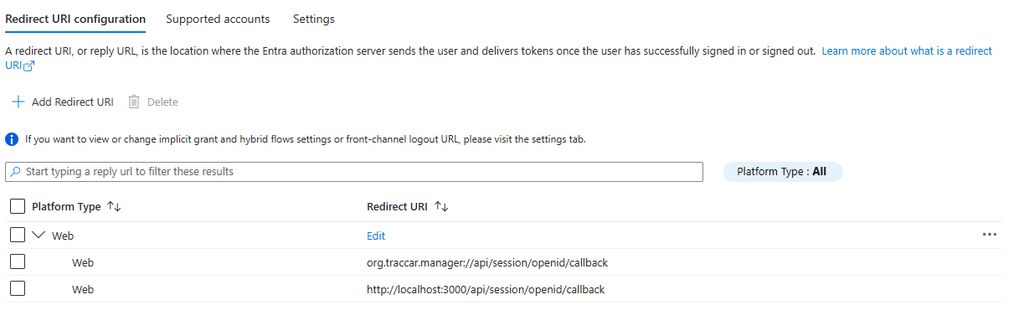
After I made the change Traccar Manager authenticated correctly.
Thanks Anton for going the extra mile. If I have some time this week I'll write up a guide to configuring OIDC with Entra ID.
Thanks for the update.
One additional note. Entra expects web redirect URL's to be valid web URLs: meaning start with http/https. The UI validation will not allow you to add the mobile redirect here.
I added it via the "Manage =>Manifest" feature like so:
"web": {
		"homePageUrl": "https://<my app url>",
		"logoutUrl": null,
		"redirectUris": [
			"https://<my app url>/api/session/openid/callback",
			"org.traccar.manager://api/session/openid/callback"
		]

Excellent this worked for me too!
Here's a quick doc on how to configure OIDC authentication with Microsoft Entra ID (minimal config):
Configuring OIDC Authentication with Entra ID
Note: This is the minimal configuration to leverage OIDC authentication with Traccar using Microsoft Entra ID. Configuring for “Auth Groups” is not included. The Azure Portal UI changes frequently, this guide was correct when published.
- Access the Azure Portal – https://portal.azure.com
- In the search box at the top of the window search for App Registrations
- Select the App Registrations item
- Click New Registration
- Enter the User Facing name for the application in the first text box
- Make the appropriate selection for Supported account types based on your use case
- Under Redirect URI:
- For ‘Select a platform’ select Web
- Enter in the redirect URI for your application such as {web-url}/api/session/openid/callback
- Click/Tap the Register button
- Under Certificates & Secrets (Left menu):
- Select New Client Secret
- Enter a Description and select an Expiration Interval in days
- Click/Tap the Add button
- The new secret is populated in middle of the screen. Select the Copy to clipboard icon after the secret “Value”. Paste and save it in a safe location; you will not be able to retrieve it again.
- Under API Permissions (Left menu):
- Select Add a permission
- Select Microsoft Graph
- Select Delegated permissions
- Type openid in the search text box then click the checkbox to select it
- Repeat these steps for the remaining permissions: email and profile
- Select Add permissions when finished
- Select Grant admin consent for app_name
If configuring the Traccar Manager Mobile App
- Under Manifest (Left menu):
- Locate the web.redirectUris attribute in the manfiest json document
- After the existing redirect uri entry entered above, add the following (note the leading comma):
, “org.traccar.manager://api/session/openid/callback”
Example:
"web": {
	"homePageUrl": null,
	"logoutUrl": null,
	"redirectUris": [
		"https://mytraccarapp.cm/api/session/openid/callback", "org.traccar.manager://api/session/openid/callback"
              ]
       }
- Click/Tap Save
Values to save into traccar.xml configuration file
- openid.clientId - Found under the App Registration ‘Overview’ page
- openid.clientSecret - Saved from above
- openid.issuerUrl - use
https://login.microsoftonline.com/directory_id_from_app_registration_overview_page/v2.0 - web.url - Your main web address for Traccar
Thank you!
If anyone has an environment I can use for testing, I can try debugging it.