Scheduled reports missing in traccar


You don't schedule reports from settings. You schedule it from reports section in the app.
What does
report.scheduler.enabledo?
Hello,
thank you for your reply.
Yes, i am trying to do it in Reports section, but I cannot find it there. Can you please provide link or navigate me where I can find it?
I am trying to set it up here .../reports/scheduled and I don't have the option to create new schedules, as seen on the first screen.I found it as a possible solution to activate reports, but it didn't do anything, so I suppose it wasn't a solution at all.
1- It's in the dropdown.
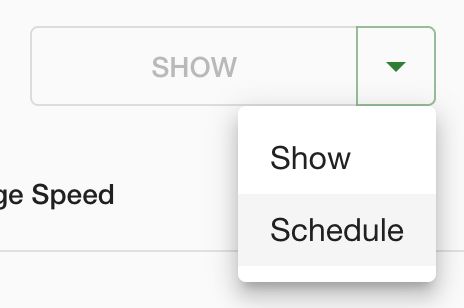
2- Can you please point to where you found it.
Hello,
I need to set up daily, weekly and monthly reports for the setup, however, I am not getting any reports. I am receiving notifications, my SMTP connection is correct, however, when I try to set up scheduled reports, I don't have the option to create new ones https://imgur.com/xm7p34j
Daily: https://imgur.com/qRBbqWx
Weekly: https://i.imgur.com/aHX5m2y.png
Monthly: https://i.imgur.com/nUiGlAh.png
Upon browsing the forum, I realized, that it is necessary to set up the scheduled reports by creating new ones with the correct callendars attached, but I am not able to identify, why I dont have the option.
My traccar.xml configuration has
<entry key='report.scheduler.enable'>true</entry>but it still didnt help.Can you please help?
Thank you very much.