Support for Teltonika FMC003 Tracker in Traccar

FMC003 Device Support Guide for Traccar
⚠️ Warning: I'm not entirely sure how this will work or if it will work at all. Everything you do is at your own risk—so seriously, backup, backup, backup.
This guide attempts to explain, step by step, how to add support for the FMC003 device to Traccar by modifying the source code and deploying the updated server, but proceed carefully.
1. Prerequisites Installation
Install Required Packages
Open a terminal and run:
Update system packages
apt update && apt upgrade -y
Install Java Development Kit (JDK 25)
apt install openjdk-25-jdk -y
Install Git
apt install git -y
Verify installations
java -version
git --version
2. Download and Prepare Source Code
Clone Traccar Repository
Navigate to source directory
cd /usr/local/src/
Clone Traccar repository with web interface
git clone --recursive https://github.com/traccar/traccar.git
Enter the cloned directory
cd traccar/
3. Modify Source Code for FMC003 Support
Edit TeltonikaProtocolDecoder.java
Open the Teltonika protocol decoder file in a text editor
nano src/main/java/org/traccar/protocol/TeltonikaProtocolDecoder.java
Add FMC003 to the Device List
Locate the static block defining the fmbXXX set (around line 40–50) and add "FMC003" to the list.
Before:
static {
    var fmbXXX = Set.of(
        "FMB001", "FMB010", "FMB002", "FMB020", "FMB003", "FMB110",
        "FMB120", "FMB122", "FMB125", "FMB130", "FMB140", "FMU125",
        "FMB900", "FMB920", "FMB962", "FMB964", "FM3001", "FMB202",
        "FMB204", "FMB206", "FMT100", "MTB100", "FMP100", "MSP500",
        "FMC130", "FMM130");
}
After:
static {
    var fmbXXX = Set.of(
        "FMB001", "FMB010", "FMB002", "FMB020", "FMB003", "FMB110",
        "FMB120", "FMB122", "FMB125", "FMB130", "FMB140", "FMU125",
        "FMB900", "FMB920", "FMB962", "FMB964", "FM3001", "FMB202",
        "FMB204", "FMB206", "FMT100", "MTB100", "FMP100", "MSP500",
        "FMC130", "FMM130", "FMC003");
}
Save and exit:
- Press
Ctrl + X - Press
Yto confirm - Press
Enterto save
4. Compile Traccar
Build from Source
Make gradlew executable
chmod +x gradlew
Clean previous builds and compile
./gradlew clean assemble
You should see:
BUILD SUCCESSFUL in [time]
Verify Build Output
Check compiled files
ls -la target/
Expected output:
tracker-server.jar– Main applicationlib/directory – All dependencies
5. Deploy to Production
Stop Traccar Service
Stop the service
systemctl stop traccar
Backup Current Installation
Backup the original JAR
cp /opt/traccar/tracker-server.jar /opt/traccar/tracker-server.jar.backup
Optional: Backup lib directory
cp -r /opt/traccar/lib /opt/traccar/lib.backup
Deploy New Files
Copy compiled JAR
cp target/tracker-server.jar /opt/traccar/
Copy all dependency libraries
cp -r target/lib/* /opt/traccar/lib/
Start Traccar Service
Start the service
systemctl start traccar
Verify service status
systemctl status traccar
✅ FMC003 is now "MUST BE" supported in your Traccar installation.

Here's the proper fix:
https://github.com/traccar/traccar/commit/6dc001fc1283980f6509930308679e39cfa7bacf
Just made a new compilation. I’ll test it and let you know how it goes.
The change didn’t have any effect; nothing changed.
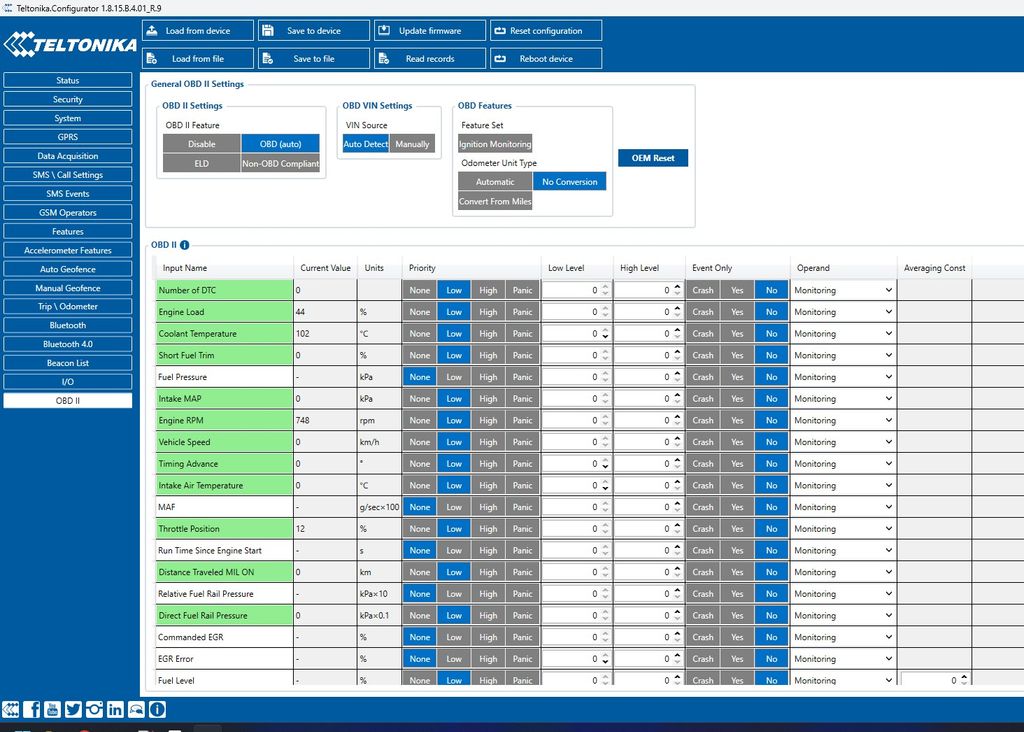
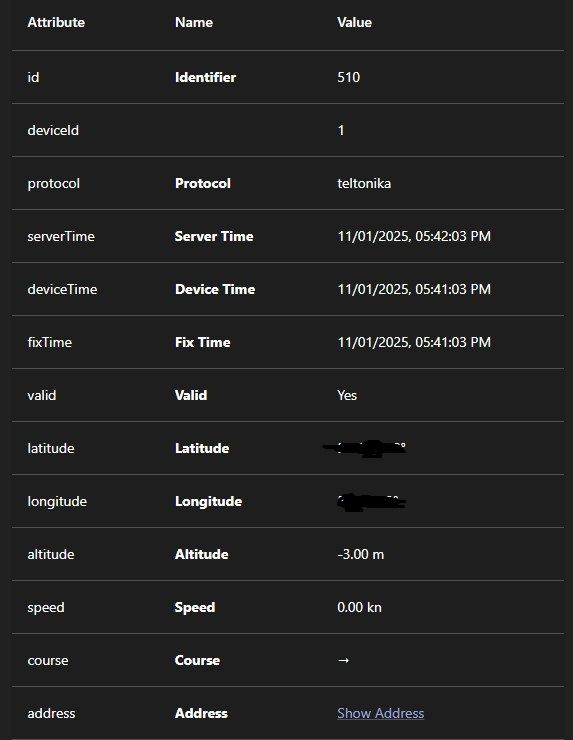
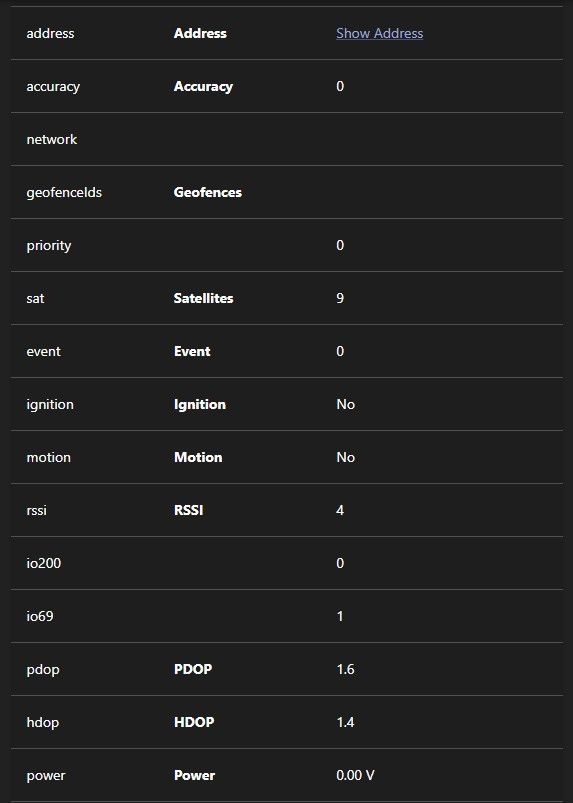
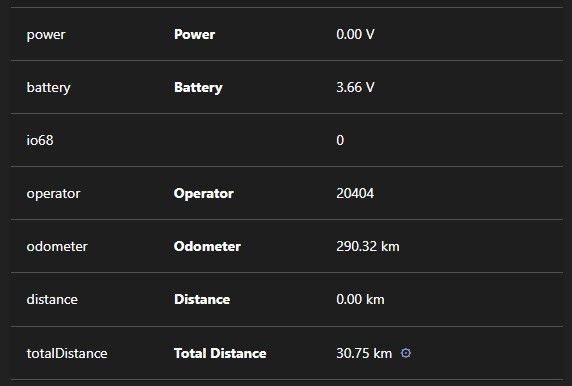
I still only get I/O data and no OBD data.
Log
2025-11-01 15:29:43  INFO: [T5a73c309] id: 864275078393454, time: 2025-11-01 15:29:36, lat: 11.1111, lon: 11.1111, speed: 3.2, course: 239.0
2025-11-01 15:29:45  INFO: [T5a73c309: teltonika < 172.16.16.2] 000000000000009d8e020000019a4009e288000307d5de1eb9e2aa001e00e40c000e00000005000200f00100290e0000000200c700007739001000046d3d000000010100001157424157423731303530503032393836350000019a4009e670000307d4901eb9e268001e00ef0c000d00000005000200f00100290c0000000200c700007739001000046d3d0000000101000011574241574237313035305030323938363502000049f8
2025-11-01 15:29:45  INFO: [T5a73c309: teltonika > 172.16.16.2] 00000002
2025-11-01 15:29:48  INFO: [T5a73c309] id: 864275078393454, time: 2025-11-01 15:29:41, lat: 11.1111, lon: 11.1111, speed: 7.6, course: 228.0
2025-11-01 15:29:48  INFO: [T5a73c309] id: 864275078393454, time: 2025-11-01 15:29:42, lat: 11.1111, lon: 11.1111, speed: 7.0, course: 239.0
2025-11-01 15:29:53  INFO: [T5a73c309: teltonika < 172.16.16.2] 00000000000000508e010000019a400a01c8000307d0551eb9e109001e00e70b000300000005000200f00100290c0000000200c700007744001000046d4800000001010000115742415742373130353050303239383635010000074a
2025-11-01 15:29:53  INFO: [T5a73c309: teltonika > 172.16.16.2] 00000001
2025-11-01 15:29:56  INFO: [T5a73c309] id: 864275078393454, time: 2025-11-01 15:29:49, lat: 11.1111, lon: 11.1111, speed: 1.6, course: 231.0
2025-11-01 15:31:40  INFO: [T5a73c309: teltonika < 172.16.16.2] 00000000000000a28e030000019a400ba3c0000307c00e1eb9ddb8002800f605000600000003000100f0010000000200c700000000001000046d67000000000000019a400ba7a8000307bf351eb9dbc4002800d705000700000003000100f0010000000200c700000000001000046d67000000000000019a400bab90000307bda61eb9dc49002800e406000700000003000100f0010000000200c700000000001000046d6d000000000300004000
2025-11-01 15:31:40  INFO: [T5a73c309: teltonika > 172.16.16.2] 00000003
2025-11-01 15:31:43  INFO: [T5a73c309] id: 864275078393454, time: 2025-11-01 15:31:36, lat: 11.1111, lon: 11.1111, speed: 3.2, course: 246.0
2025-11-01 15:31:43  INFO: [T5a73c309] id: 864275078393454, time: 2025-11-01 15:31:37, lat: 11.1111, lon: 11.1111, speed: 3.8, course: 215.0
2025-11-01 15:31:43  INFO: [T5a73c309] id: 864275078393454, time: 2025-11-01 15:31:38, lat: 11.1111, lon: 11.1111, speed: 3.8, course: 228.0
2025-11-01 15:31:44  INFO: [T5a73c309: teltonika < 172.16.16.2] 00000000000000388e010000019a400bb360000307bb2c1eb9dcdf002800f207000800000003000100f0010000000200c700000000001000046d72000000000100007d7c
2025-11-01 15:31:44  INFO: [T5a73c309: teltonika > 172.16.16.2] 00000001
2025-11-01 15:31:47  INFO: [T5a73c309] id: 864275078393454, time: 2025-11-01 15:31:40, lat: 11.1111, lon: 11.1111, speed: 4.3, course: 242.0
2025-11-01 15:31:52  INFO: [T5a73c309: teltonika < 172.16.16.2] 000000000000006d8e020000019a400bd2a0000307b3091eb9dc59002a00fe06000800000003000100f0010000000200c700000000001000046d81000000000000019a400bd688000307b2841eb9dcad002a010905000800000003000100f0010000000200c700000000001000046d840000000002000048e6
2025-11-01 15:31:52  INFO: [T5a73c309: teltonika > 172.16.16.2] 00000002
2025-11-01 15:31:55  INFO: [T5a73c309] id: 864275078393454, time: 2025-11-01 15:31:48, lat: 11.1111, lon: 11.1111, speed: 4.3, course: 254.0
2025-11-01 15:31:55  INFO: [T5a73c309] id: 864275078393454, time: 2025-11-01 15:31:49, lat: 11.1111, lon: 11.1111, speed: 4.3, course: 265.0
2025-11-01 15:32:31  INFO: [T5a73c309: teltonika < 172.16.16.2] 00000000000000388e010000019a400c6af8000307cd241eb9ef3b001c00e004000600000003000100f0010000000200c700000000001000046ddd000000000100001ba0
2025-11-01 15:32:31  INFO: [T5a73c309: teltonika > 172.16.16.2] 00000001
2025-11-01 15:32:34  INFO: [T5a73c309] id: 864275078393454, time: 2025-11-01 15:32:27, lat: 11.1111, lon: 11.1111, speed: 3.2, course: 224.0
2025-11-01 15:33:39  INFO: [T5a73c309: teltonika < 172.16.16.2] 00000000000000388e010000019a400d7498000307cd241eb9ef3b0000000000000000f00003000100f0000000000200c700000000001000046ddd000000000100006dd4
2025-11-01 15:33:39  INFO: [T5a73c309: teltonika > 172.16.16.2] 00000001
2025-11-01 15:33:42  INFO: [T5a73c309] id: 864275078393454, time: 2025-11-01 15:33:35, lat: 11.1111, lon: 11.1111, course: 0.0
2025-11-01 15:35:15  INFO: [T5a73c309: teltonika < 172.16.16.2] 00000000000000ad8e020000019a400dd640000307cd241eb9ef3b0000000000000000ef000c000500ef0000f00000150400c800004502000500b5000000b600000042004400430f9700440000000200f100004fb4001000046ddd000000000000019a400ef750000307cd241eb9ef3b0000000000000000f0000c000500ef0000f00100150400c800004502000500b5000000b600000042000000430fa500440000000200f100004fb4001000046ddd
2025-11-01 15:35:15  INFO: [T5a73c309: teltonika < 172.16.16.2] 000000000200001b00
2025-11-01 15:35:15  INFO: [T5a73c309: teltonika > 172.16.16.2] 00000002
Maybe that will also give some information
https://community.teltonika.lt/t/fmc003-no-obd-data-transmission-for-bmw-3-series/16235
Based on the screenshots you provided, it seems like your device is simply not sending that data.
I have a log from the device that behaves like this: some records are sent, but only a few actually arrive.
Example record from the log:
[2025.11.03 15:09:33] - [REC.GEN] Record Content:
Timestamp : 1762182573000
Priority : 1
Latitude : 51.543233
Longitude : 5.085242
Altitude : 21
Angle : 75
Speed : 2
HDOP : 1.0
SatInUse : 13
GPS Fix : 1
GSpeed : 0, src: GNSS
Event AVL ID: 0
IO Data:
ID[239]: 1
ID[200]: 0
ID[69] : 1
ID[41] : 12
ID[66] : 14047
ID[67] : 4126
ID[68] : 33
ID[16] : 374629
Record Size: 105 Bytes
I am also discussing this issue on the Teltonika forum:
https://community.teltonika.lt/t/fmc003-no-obd-data-transmission-for-bmw-3-series/16235
Additionally, I have noticed that for records with two-digit IO IDs, there appears to be a space before the number (e.g., ID[ 69]). I’m not sure if this is relevant or causing any issues.
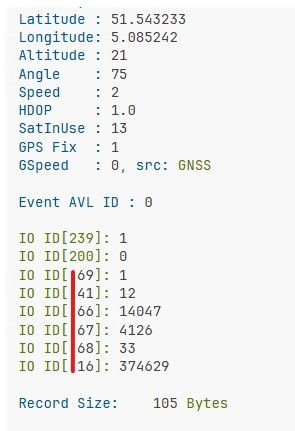
If the device is sending those, you should see them in Traccar as well.
Hi all,
I am currently using a Teltonika FMC003 tracker and have noticed that the server is not accepting the device's OBD data.
After reviewing the server configuration, I found that in the file:
/opt/traccar/jre/bin/java -jar tracker-server.jar
The tracker-server.jar does not appear to include FMC003 in the list of supported devices. Specifically, in the code block:
static {
var fmbXXX = Set.of(
"FMB001", "FMC001", "FMB010", "FMB002", "FMB020", "FMB003", "FMB110", "FMB120", "FMB122", "FMB125",
"FMB130", "FMB140", "FMU125", "FMB900", "FMB920", "FMB962", "FMB964", "FM3001", "FMB202", "FMB204",
"FMB206", "FMT100", "MTB100", "FMP100", "MSP500", "FMC125", "FMM125", "FMU130", "FMC130", "FMM130",
"FMB150", "FMC150", "FMM150", "FMC920"
);
}
The FMC003 model is not listed, although it shares many parameters with the existing FMBxxx family, which is already supported.
Could you please advise if and when support for the FMC003 tracker will be added?
For reference, the device parameters can be found here, and more about the tracker-server.jar file:
https://wiki.teltonika-gps.com/view/FMC003_Teltonika_Data_Sending_Parameters_ID
https://github.com/traccar/traccar/issues/5132
Thank you for your assistance.