Traccar into a Modern Fleet Management Platform


That looks truly impressive!
What is currently working, and what isn't yet?
Are there any plans to change the language?
Is there a roadmap outlining the planned implementations and their timelines?
The implementation so far is first-class—excellent work!

I have rewrite with typescript using deepseek v4 flash. https://github.com/onethings/mix_gps testing with demo3.traccar.org , u can login with demo3.traccar.org account at live demo https://fleetlymm.pages.dev/

I have installed mix_gps repo on my live server looks very impressive. On the live tracking Im not able to see some devices on the map parked, moving. And when I zoom into the map on a device, the location moves, as I zoom.
onething and sathasivam, very impressive dashboard. Will check in if yourll have any updates.
i have update it with new look, https://github.com/onethings/mix_gps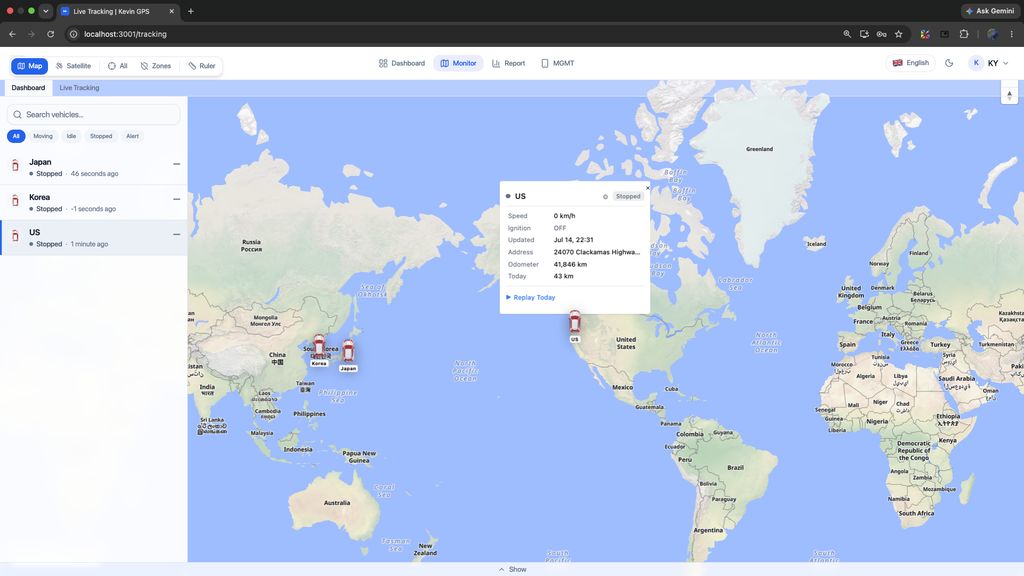
Also have flutter version for mobile app, u can try @jay , https://github.com/onethings/trabcdefg
Last night rewrite traccar-web with typescript using deepseek v4 flash, https://github.com/onethings/typescript_web_raccart
@onethings. I have my subdomain on cloudflare, is there a setting to do. Live server once entering logins, error is fail to fetch.
When the frontend (traccar-web) and backend (traccar) are hosted on different domains, ports, or network segments, the browser blocks cross-origin requests due to CORS (Cross-Origin Resource Sharing) security policies.
To resolve this during production or direct connection setup, you need to configure the Traccar backend to explicitly allow requests from your frontend domain. By adding the appropriate configuration keys to traccar.xml, the Traccar backend will include the necessary CORS headers in its HTTP responses, allowing the browser to approve the requests.
XML Configuration Example
Add the following configuration to traccar.xml (replace the URL with your actual frontend domain):
<entry key='web.origin'>http://localhost:3000</entry>
@onething. yes this helped <entry key='web.origin'>http://localhost:3000</entry>. I edit to my server and I could log in, the dashboard look very impressive well done. On the reports side, on trips, when I try to only select one vehicle, the tick are selected to all devices, takes a long time to untick and then select a specific device. also can you export to a normal excel instead on CSV, cause when I download a csv file, and I filter, I am not getting a proper address. On the normal traccar web, I can get the start address, end address etc on the excel report. Also when I select reports on the left side, error says something went wrong, but when I select reports at the top, I can get into reports. Thank you again for a superb dashboard.
@jay left side tript url fix, trip report fill 12 column(include start/end address) as default, all device select logic fix. Thx.
@onethings. All of these issues have been resolved.App is looking excellent, great work. Are you able to change the trips report from csv to excel file, so the data looks clean in excel, same as traccar. see image, a clean trip report.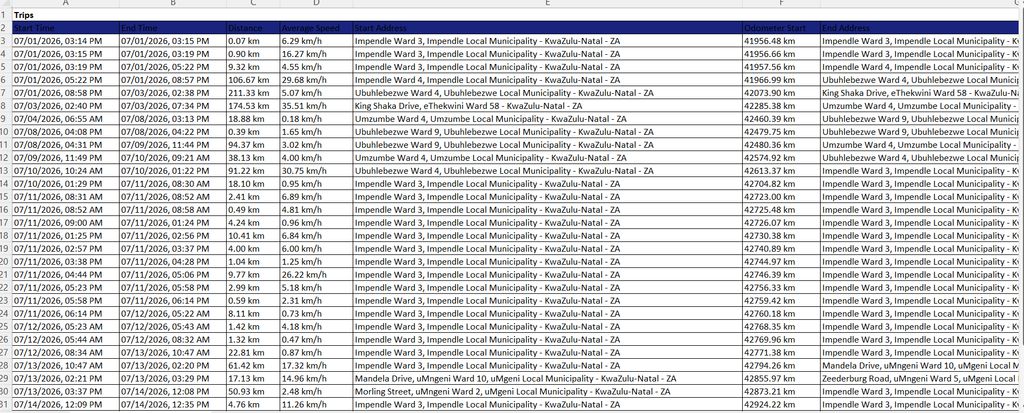
@onething, how can we transform this index.html to a working andriod apk app. if you run the index.html file the app look very nice for a phone.
https://drive.google.com/file/d/16jl0VsbJ1TT636Kg11a5k4Li6fUZ5xIU/view?usp=sharing
@jay all report add csv, xlsx, pdf format to download. For android apk app, you can use Traccar Manager at line 105 https://github.com/traccar/traccar-manager/blob/880409555fadb57ba95bbc5490d3e8bff8ea3be5/lib/main_screen.dart#L105 change https://demo.traccar.org to you live server url and generate flutter android apk.
final url = _preferences.getString(_urlKey) ?? 'https://demo.traccar.org';
to
final url = _preferences.getString(_urlKey) ?? 'https://your-live-traccar-server.com';
@onethings. The webapp and reports are now working at 100%. Great work once again. any more updates, let me know so I can test on my side.
@onething. Traccar manager is basic, there no modern look. Is there a new modern look that you are looking at? If you save the code on index.html and open the file in chrome browser, this looks impressive. https://drive.google.com/file/d/16jl0VsbJ1TT636Kg11a5k4Li6fUZ5xIU/view?usp=sharing
I have been running the Traccar backend on my server, and the backend server has not been modified.