Traccar on Yunohost and Nginx


Try this configuration, don't forget to generate the SSL certificates.
# Put this in the "http" context, outside of any "server" blocks
map $http_upgrade $connection_upgrade {
    default upgrade;
    ''      close;
}

server {
    listen 80;
    listen [::]:80;
    server_name traccar.mydomain.com;

    access_by_lua_file /usr/share/ssowat/access.lua;

    include /etc/nginx/conf.d/acme-challenge.conf.inc;

    location ^~ /.well-known/ynh-diagnosis/ {
        alias /var/www/.well-known/ynh-diagnosis/;
    }

    location ^~ /.well-known/autoconfig/mail/ {
        alias /var/www/.well-known/traccar.mydomain.com/autoconfig/mail/;
    }

    location / {
        return 301 https://$host$request_uri;
    }

    include /etc/nginx/conf.d/yunohost_http_errors.conf.inc;

    access_log /var/log/nginx/traccar.mydomain.com-access.log;
    error_log /var/log/nginx/traccar.mydomain.com-error.log;
}

server {
    listen 443 ssl http2;
    listen [::]:443 ssl http2;
    server_name traccar.mydomain.com;

    include /etc/nginx/conf.d/security.conf.inc;

    ssl_certificate /etc/yunohost/certs/traccar.mydomain.com/crt.pem;
    ssl_certificate_key /etc/yunohost/certs/traccar.mydomain.com/key.pem;

    more_set_headers "Strict-Transport-Security: max-age=63072000; includeSubDomains; preload";

    # OCSP settings
    ssl_stapling on;
    ssl_stapling_verify on;
    ssl_trusted_certificate /etc/yunohost/certs/traccar.mydomain.com/crt.pem;
    resolver 1.1.1.1 9.9.9.9 valid=300s;
    resolver_timeout 5s;

    location ^~ /.well-known/autoconfig/mail/ {
        alias /var/www/.well-known/traccar.mydomain.com/autoconfig/mail/;
    }

    access_by_lua_file /usr/share/ssowat/access.lua;

    include /etc/nginx/conf.d/traccar.mydomain.com.d/*.conf;

    include /etc/nginx/conf.d/yunohost_sso.conf.inc;
    include /etc/nginx/conf.d/yunohost_admin.conf.inc;
    include /etc/nginx/conf.d/yunohost_api.conf.inc;
    include /etc/nginx/conf.d/yunohost_http_errors.conf.inc;

    access_log /var/log/nginx/traccar.mydomain.com-access.log;
    error_log /var/log/nginx/traccar.mydomain.com-error.log;
}
I forgot the proxy_pass
map $http_upgrade $connection_upgrade {
    default upgrade;
    ''      close;
}

server {
    listen 80;
    listen [::]:80;
    server_name traccar.mydomain.com;

    access_by_lua_file /usr/share/ssowat/access.lua;

    include /etc/nginx/conf.d/acme-challenge.conf.inc;

    location ^~ /.well-known/ynh-diagnosis/ {
        alias /var/www/.well-known/ynh-diagnosis/;
    }

    location ^~ /.well-known/autoconfig/mail/ {
        alias /var/www/.well-known/traccar.mydomain.com/autoconfig/mail/;
    }

    location / {
        return 301 https://$host$request_uri;
    }

    include /etc/nginx/conf.d/yunohost_http_errors.conf.inc;

    access_log /var/log/nginx/traccar.mydomain.com-access.log;
    error_log /var/log/nginx/traccar.mydomain.com-error.log;
}

server {
    listen 443 ssl http2;
    listen [::]:443 ssl http2;
    server_name traccar.mydomain.com;

    include /etc/nginx/conf.d/security.conf.inc;

    ssl_certificate /etc/yunohost/certs/traccar.mydomain.com/crt.pem;
    ssl_certificate_key /etc/yunohost/certs/traccar.mydomain.com/key.pem;

    more_set_headers "Strict-Transport-Security: max-age=63072000; includeSubDomains; preload";

    ssl_stapling on;
    ssl_stapling_verify on;
    ssl_trusted_certificate /etc/yunohost/certs/traccar.mydomain.com/crt.pem;
    resolver 1.1.1.1 9.9.9.9 valid=300s;
    resolver_timeout 5s;

    location ^~ /.well-known/autoconfig/mail/ {
        alias /var/www/.well-known/traccar.mydomain.com/autoconfig/mail/;
    }

    access_by_lua_file /usr/share/ssowat/access.lua;

    # PROXY TRACCAR
    location / {
        proxy_pass http://localhost:8082;  # ajuste se o Traccar estiver em outro IP/porta
        proxy_http_version 1.1;
        proxy_set_header Host $host;
        proxy_set_header X-Real-IP $remote_addr;
        proxy_set_header X-Forwarded-For $proxy_add_x_forwarded_for;
        proxy_set_header X-Forwarded-Proto $scheme;
        proxy_set_header Upgrade $http_upgrade;
        proxy_set_header Connection $connection_upgrade;
    }

    include /etc/nginx/conf.d/yunohost_sso.conf.inc;
    include /etc/nginx/conf.d/yunohost_admin.conf.inc;
    include /etc/nginx/conf.d/yunohost_api.conf.inc;
    include /etc/nginx/conf.d/yunohost_http_errors.conf.inc;

    access_log /var/log/nginx/traccar.mydomain.com-access.log;
    error_log /var/log/nginx/traccar.mydomain.com-error.log;
}
Hello,
thanks a lot for your reply.
I copied / pasted your config directly but it makes nginx stop working (the traccar.mydomain.com becomes inaccessible)
I looked the IP address that is in the traccar.conf file into the traccar.mydomain.com.d subdir and write in place of proxy_pass http://localhost:8082;,
but it doesn't work too.
Here the /etc/nginx/conf.d/traccar.mydomain.com.d/traccar.conf file:
location / {
    proxy_pass       http://127.0.0.1:23240/;
    proxy_set_header X-Forwarded-Host $host:$server_port;
    proxy_set_header X-Forwarded-Server $host;
    proxy_set_header X-Forwarded-For $proxy_add_x_forwarded_for;
}

location /api/socket {
    include proxy_params;
    proxy_http_version 1.1;
    proxy_cache_bypass $http_upgrade;
    proxy_buffering off;
    proxy_set_header Host $host;
    proxy_set_header Upgrade $http_upgrade;
    proxy_set_header Connection "Upgrade";
    proxy_pass http://127.0.0.1:23240/api/socket;
}
Thanks a lot in advance.
This is my configuration and it works perfectly, use it as an example and change what is necessary for your case.
server {
    listen 80 default_server;
    listen [::]:80 default_server;

    server_name XXX.com www.XXX.com;

    # Redireciona HTTP para HTTPS
    return 301 https://$host$request_uri;
}

server {
    listen 443 ssl http2;
    server_name sat.vix.br www.sat.vix.br;

    ssl_certificate /etc/letsencrypt/live/sat.vix.br/fullchain.pem;
    ssl_certificate_key /etc/letsencrypt/live/sat.vix.br/privkey.pem;
    include /etc/letsencrypt/options-ssl-nginx.conf;
    ssl_dhparam /etc/letsencrypt/ssl-dhparams.pem;

    ## Proxy para a aplicação principal
    location / {
        proxy_pass http://0.0.0.0:8082;
        proxy_http_version 1.1;
        proxy_set_header Upgrade $http_upgrade;
        proxy_set_header Connection "upgrade";
        proxy_set_header Host $host;
        proxy_set_header X-Real-IP $remote_addr;
        proxy_set_header X-Forwarded-For $proxy_add_x_forwarded_for;

        # Desabilitando cache no proxy
        proxy_no_cache 1;
        proxy_cache_bypass 1;
        add_header Cache-Control "no-store, no-cache, must-revalidate, proxy-revalidate, max-age=0";
        add_header Pragma "no-cache";
        add_header Expires 0;
    }

    ## Proxy para WebSocket
    location /api/socket {
        proxy_pass http://127.0.0.1:8082/api/socket;
        proxy_http_version 1.1;
        proxy_set_header Upgrade $http_upgrade;
        proxy_set_header Connection "upgrade";
    }
}
Hello,
thanks a lot for your reply.
I try to adapt your last config, but I can't find theses files on my system:
include /etc/letsencrypt/options-ssl-nginx.conf;
ssl_dhparam /etc/letsencrypt/ssl-dhparams.pem;
Sorry...
As I told you before, you need to generate the SSL certificates, in my case I use the Letsencrypt bot, to generate these certificates without having to pay for them.
See the example in the link below:
https://www.digitalocean.com/community/tutorials/how-to-secure-nginx-with-let-s-encrypt-on-ubuntu-20-04
Hello,
sorry I'm not a computer scientist at all but just an amateur that have good abilities, however sometimes things are not natural for me.
I can't understand: as I believed, certificate is already installed by yunohost: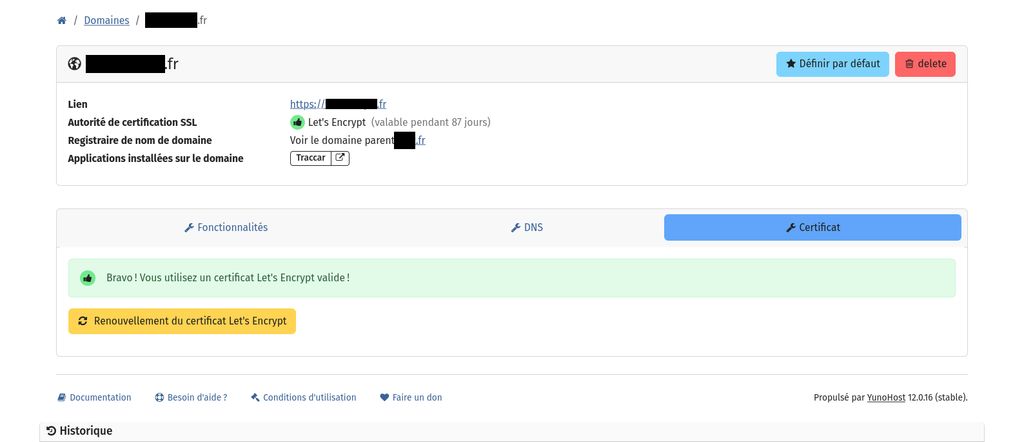
So I know where to find crt.pem and key.pem, but not options-ssl-nginx.conf and ssl-dhparams.pem
Thanks a lot in advance for your help,
Pascal
I understand, maybe in your case this entry (options-ssl-nginx.conf) is not necessary.
So I tested this:
server {
    listen 80 default_server;
    listen [::]:80 default_server;

    server_name traccar.mydomain.com www.traccar.mydomain.com;

    # Redireciona HTTP para HTTPS
    return 301 https://$host$request_uri;
}

server {
    listen 443 ssl http2;
    server_name traccar.mydomain.com www.traccar.mydomain.com;

    ssl_certificate /etc/yunohost/certs/traccar.mydomain.com/crt.pem;
    ssl_certificate_key /etc/yunohost/certs/traccar.mydomain.com/key.pem;


    ## Proxy para a aplicação principal
    location / {
        proxy_pass http://0.0.0.0:8082;
        proxy_http_version 1.1;
        proxy_set_header Upgrade $http_upgrade;
        proxy_set_header Connection "upgrade";
        proxy_set_header Host $host;
        proxy_set_header X-Real-IP $remote_addr;
        proxy_set_header X-Forwarded-For $proxy_add_x_forwarded_for;

        # Desabilitando cache no proxy
        proxy_no_cache 1;
        proxy_cache_bypass 1;
        add_header Cache-Control "no-store, no-cache, must-revalidate, proxy-revalidate, max-age=0";
        add_header Pragma "no-cache";
        add_header Expires 0;
    }

    ## Proxy para WebSocket
    location /api/socket {
        proxy_pass http://127.0.0.1:8082/api/socket;
        proxy_http_version 1.1;
        proxy_set_header Upgrade $http_upgrade;
        proxy_set_header Connection "upgrade";
    }
}
Then I changed the line "proxy_pass" by
proxy_pass http://0.0.0.0:8082;
but it makes nginx stop functioning.
And what error does nginx report?
Hello,
for the last configuration I tested, here the journalctl log:
mai 09 17:17:30 systemd[1]: Stopping nginx.service - A high performance web server and a reverse proxy server...
mai 09 17:17:30 systemd[1]: nginx.service: Deactivated successfully.
mai 09 17:17:30 systemd[1]: Stopped nginx.service - A high performance web server and a reverse proxy server.
mai 09 17:17:30 systemd[1]: nginx.service: Consumed 1min 32.746s CPU time.
mai 09 17:17:30 systemd[1]: Starting nginx.service - A high performance web server and a reverse proxy server...
mai 09 17:17:30 nginx[28475]: 2025/05/09 17:17:30 [emerg] 28475#28475: a duplicate default server for 0.0.0.0:80 in /etc/nginx/conf.d/yunohost_admin.conf:2
mai 09 17:17:30 nginx[28475]: nginx: configuration file /etc/nginx/nginx.conf test failed
mai 09 17:17:30 systemd[1]: nginx.service: Control process exited, code=exited, status=1/FAILURE
mai 09 17:17:30 systemd[1]: nginx.service: Failed with result 'exit-code'.
mai 09 17:17:30 systemd[1]: Failed to start nginx.service - A high performance web server and a reverse proxy server.
mai 09 17:19:06 systemd[1]: Starting nginx.service - A high performance web server and a reverse proxy server...
mai 09 17:19:06 nginx[28490]: 2025/05/09 17:19:06 [emerg] 28490#28490: a duplicate default server for 0.0.0.0:80 in /etc/nginx/conf.d/yunohost_admin.conf:2
mai 09 17:19:06 nginx[28490]: nginx: configuration file /etc/nginx/nginx.conf test failed
mai 09 17:19:06 systemd[1]: nginx.service: Control process exited, code=exited, status=1/FAILURE
mai 09 17:19:06 systemd[1]: nginx.service: Failed with result 'exit-code'.
mai 09 17:19:06 systemd[1]: Failed to start nginx.service - A high performance web server and a reverse proxy server.
mai 09 17:21:09 systemd[1]: Starting nginx.service - A high performance web server and a reverse proxy server...
mai 09 17:21:10 nginx[28516]: 2025/05/09 17:21:09 [info] 28516#28516: Using 116KiB of shared memory for nchan in /etc/nginx/nginx.conf:61
mai 09 17:21:10 nginx[28516]: 2025/05/09 17:21:09 [info] 28516#28516: Using 131072KiB of shared memory for nchan in /etc/nginx/nginx.conf:61
mai 09 17:21:10 systemd[1]: Started nginx.service - A high performance web server and a reverse proxy server.
mai 09 17:21:12 systemd[1]: Stopping nginx.service - A high performance web server and a reverse proxy server...
mai 09 17:21:12 systemd[1]: nginx.service: Deactivated successfully.
For all useful purposes, here the log since my first message here:
mai 08 12:32:40 mydomain.com systemd[1]: Stopping nginx.service - A high performance web server and a reverse proxy server...
mai 08 12:32:40 mydomain.com systemd[1]: nginx.service: Deactivated successfully.
mai 08 12:32:40 mydomain.com systemd[1]: Stopped nginx.service - A high performance web server and a reverse proxy server.
mai 08 12:32:40 mydomain.com systemd[1]: nginx.service: Consumed 5min 37.661s CPU time.
-- Boot 5b62777ccd7e4fb3b1c329970433142a --
mai 08 12:33:19 mydomain.com systemd[1]: Starting nginx.service - A high performance web server and a reverse proxy server...
mai 08 12:33:19 mydomain.com nginx[1308]: 2025/05/08 12:33:19 [warn] 1308#1308: "ssl_stapling" ignored, host not found in OCSP responder "r10.o.lencr.org" in the certificate "/etc/yunohost/certs/owncloud.mydomain.com/crt.pem"
mai 08 12:33:19 mydomain.com nginx[1308]: 2025/05/08 12:33:19 [warn] 1308#1308: "ssl_stapling" ignored, host not found in OCSP responder "r10.o.lencr.org" in the certificate "/etc/yunohost/certs/rustdesk.mydomain.com/crt.pem"
mai 08 12:33:19 mydomain.com nginx[1308]: 2025/05/08 12:33:19 [warn] 1308#1308: "ssl_stapling" ignored, host not found in OCSP responder "r11.o.lencr.org" in the certificate "/etc/yunohost/certs/syncserver.mydomain.com/crt.pem"
mai 08 12:33:20 mydomain.com nginx[1308]: 2025/05/08 12:33:19 [warn] 1308#1308: "ssl_stapling" ignored, host not found in OCSP responder "r10.o.lencr.org" in the certificate "/etc/yunohost/certs/traccar.mydomain.com/crt.pem"
mai 08 12:33:20 mydomain.com nginx[1308]: 2025/05/08 12:33:19 [info] 1308#1308: Using 116KiB of shared memory for nchan in /etc/nginx/nginx.conf:61
mai 08 12:33:20 mydomain.com nginx[1308]: 2025/05/08 12:33:19 [info] 1308#1308: Using 131072KiB of shared memory for nchan in /etc/nginx/nginx.conf:61
mai 08 12:33:20 mydomain.com nginx[1434]: 2025/05/08 12:33:20 [warn] 1434#1434: "ssl_stapling" ignored, host not found in OCSP responder "r10.o.lencr.org" in the certificate "/etc/yunohost/certs/owncloud.mydomain.com/crt.pem"
mai 08 12:33:20 mydomain.com nginx[1434]: 2025/05/08 12:33:20 [warn] 1434#1434: "ssl_stapling" ignored, host not found in OCSP responder "r10.o.lencr.org" in the certificate "/etc/yunohost/certs/rustdesk.mydomain.com/crt.pem"
mai 08 12:33:20 mydomain.com nginx[1434]: 2025/05/08 12:33:20 [warn] 1434#1434: "ssl_stapling" ignored, host not found in OCSP responder "r11.o.lencr.org" in the certificate "/etc/yunohost/certs/syncserver.mydomain.com/crt.pem"
mai 08 12:33:20 mydomain.com nginx[1434]: 2025/05/08 12:33:20 [warn] 1434#1434: "ssl_stapling" ignored, host not found in OCSP responder "r10.o.lencr.org" in the certificate "/etc/yunohost/certs/traccar.mydomain.com/crt.pem"
mai 08 12:33:20 mydomain.com systemd[1]: Started nginx.service - A high performance web server and a reverse proxy server.
mai 08 12:39:28 mydomain.com systemd[1]: Stopping nginx.service - A high performance web server and a reverse proxy server...
mai 08 12:39:28 mydomain.com systemd[1]: nginx.service: Deactivated successfully.
mai 08 12:39:28 mydomain.com systemd[1]: Stopped nginx.service - A high performance web server and a reverse proxy server.
mai 08 12:39:28 mydomain.com systemd[1]: nginx.service: Consumed 1.281s CPU time.
-- Boot b60f27a5bc72465a958672efebde71d4 --
mai 08 12:40:05 mydomain.com systemd[1]: Starting nginx.service - A high performance web server and a reverse proxy server...
mai 08 12:40:05 mydomain.com nginx[1116]: 2025/05/08 12:40:05 [warn] 1116#1116: "ssl_stapling" ignored, host not found in OCSP responder "r10.o.lencr.org" in the certificate "/etc/yunohost/certs/owncloud.mydomain.com/crt.pem"
mai 08 12:40:05 mydomain.com nginx[1116]: 2025/05/08 12:40:05 [warn] 1116#1116: "ssl_stapling" ignored, host not found in OCSP responder "r10.o.lencr.org" in the certificate "/etc/yunohost/certs/rustdesk.mydomain.com/crt.pem"
mai 08 12:40:05 mydomain.com nginx[1116]: 2025/05/08 12:40:05 [warn] 1116#1116: "ssl_stapling" ignored, host not found in OCSP responder "r11.o.lencr.org" in the certificate "/etc/yunohost/certs/syncserver.mydomain.com/crt.pem"
mai 08 12:40:05 mydomain.com nginx[1116]: 2025/05/08 12:40:05 [warn] 1116#1116: "ssl_stapling" ignored, host not found in OCSP responder "r10.o.lencr.org" in the certificate "/etc/yunohost/certs/traccar.mydomain.com/crt.pem"
mai 08 12:40:05 mydomain.com nginx[1116]: 2025/05/08 12:40:05 [info] 1116#1116: Using 116KiB of shared memory for nchan in /etc/nginx/nginx.conf:61
mai 08 12:40:05 mydomain.com nginx[1116]: 2025/05/08 12:40:05 [info] 1116#1116: Using 131072KiB of shared memory for nchan in /etc/nginx/nginx.conf:61
mai 08 12:40:05 mydomain.com nginx[1235]: 2025/05/08 12:40:05 [warn] 1235#1235: "ssl_stapling" ignored, host not found in OCSP responder "r10.o.lencr.org" in the certificate "/etc/yunohost/certs/owncloud.mydomain.com/crt.pem"
mai 08 12:40:05 mydomain.com nginx[1235]: 2025/05/08 12:40:05 [warn] 1235#1235: "ssl_stapling" ignored, host not found in OCSP responder "r10.o.lencr.org" in the certificate "/etc/yunohost/certs/rustdesk.mydomain.com/crt.pem"
mai 08 12:40:05 mydomain.com nginx[1235]: 2025/05/08 12:40:05 [warn] 1235#1235: "ssl_stapling" ignored, host not found in OCSP responder "r11.o.lencr.org" in the certificate "/etc/yunohost/certs/syncserver.mydomain.com/crt.pem"
mai 08 12:40:05 mydomain.com nginx[1235]: 2025/05/08 12:40:05 [warn] 1235#1235: "ssl_stapling" ignored, host not found in OCSP responder "r10.o.lencr.org" in the certificate "/etc/yunohost/certs/traccar.mydomain.com/crt.pem"
mai 08 12:40:05 mydomain.com systemd[1]: Started nginx.service - A high performance web server and a reverse proxy server.
mai 08 12:51:39 mydomain.com systemd[1]: Stopping nginx.service - A high performance web server and a reverse proxy server...
mai 08 12:51:44 mydomain.com systemd[1]: nginx.service: Stopping timed out. Terminating.
mai 08 12:51:44 mydomain.com systemd[1]: nginx.service: Failed with result 'timeout'.
mai 08 12:51:44 mydomain.com systemd[1]: Stopped nginx.service - A high performance web server and a reverse proxy server.
mai 08 12:51:44 mydomain.com systemd[1]: nginx.service: Consumed 2.081s CPU time.
mai 08 12:51:44 mydomain.com systemd[1]: Starting nginx.service - A high performance web server and a reverse proxy server...
mai 08 12:51:44 mydomain.com nginx[3679]: 2025/05/08 12:51:44 [info] 3679#3679: Using 116KiB of shared memory for nchan in /etc/nginx/nginx.conf:61
mai 08 12:51:44 mydomain.com nginx[3679]: 2025/05/08 12:51:44 [info] 3679#3679: Using 131072KiB of shared memory for nchan in /etc/nginx/nginx.conf:61
mai 08 12:51:44 mydomain.com systemd[1]: Started nginx.service - A high performance web server and a reverse proxy server.
mai 08 15:12:26 mydomain.com systemd[1]: Stopping nginx.service - A high performance web server and a reverse proxy server...
mai 08 15:12:26 mydomain.com systemd[1]: nginx.service: Deactivated successfully.
mai 08 15:12:26 mydomain.com systemd[1]: Stopped nginx.service - A high performance web server and a reverse proxy server.
mai 08 15:12:26 mydomain.com systemd[1]: nginx.service: Consumed 13.202s CPU time.
-- Boot eca7ed72de1f4f01861d7beb5bed3d65 --
mai 08 15:13:06 mydomain.com systemd[1]: Starting nginx.service - A high performance web server and a reverse proxy server...
mai 08 15:13:06 mydomain.com nginx[1172]: 2025/05/08 15:13:06 [emerg] 1172#1172: invalid number of arguments in "proxy_pass" directive in /etc/nginx/conf.d/traccar.mydomain.com.conf:74
mai 08 15:13:06 mydomain.com nginx[1172]: nginx: configuration file /etc/nginx/nginx.conf test failed
mai 08 15:13:06 mydomain.com systemd[1]: nginx.service: Control process exited, code=exited, status=1/FAILURE
mai 08 15:13:06 mydomain.com systemd[1]: nginx.service: Failed with result 'exit-code'.
mai 08 15:13:06 mydomain.com systemd[1]: Failed to start nginx.service - A high performance web server and a reverse proxy server.
-- Boot b22f982a4bd14ef6a0036b79bf7c3a51 --
mai 08 15:17:08 mydomain.com systemd[1]: Starting nginx.service - A high performance web server and a reverse proxy server...
mai 08 15:17:08 mydomain.com nginx[1289]: 2025/05/08 15:17:08 [warn] 1289#1289: "ssl_stapling" ignored, host not found in OCSP responder "r10.o.lencr.org" in the certificate "/etc/yunohost/certs/owncloud.mydomain.com/crt.pem"
mai 08 15:17:08 mydomain.com nginx[1289]: 2025/05/08 15:17:08 [warn] 1289#1289: "ssl_stapling" ignored, host not found in OCSP responder "r10.o.lencr.org" in the certificate "/etc/yunohost/certs/rustdesk.mydomain.com/crt.pem"
mai 08 15:17:08 mydomain.com nginx[1289]: 2025/05/08 15:17:08 [warn] 1289#1289: "ssl_stapling" ignored, host not found in OCSP responder "r11.o.lencr.org" in the certificate "/etc/yunohost/certs/syncserver.mydomain.com/crt.pem"
mai 08 15:17:09 mydomain.com nginx[1289]: 2025/05/08 15:17:08 [warn] 1289#1289: "ssl_stapling" ignored, host not found in OCSP responder "r10.o.lencr.org" in the certificate "/etc/yunohost/certs/traccar.mydomain.com/crt.pem"
mai 08 15:17:09 mydomain.com nginx[1289]: 2025/05/08 15:17:08 [info] 1289#1289: Using 116KiB of shared memory for nchan in /etc/nginx/nginx.conf:61
mai 08 15:17:09 mydomain.com nginx[1289]: 2025/05/08 15:17:08 [info] 1289#1289: Using 131072KiB of shared memory for nchan in /etc/nginx/nginx.conf:61
mai 08 15:17:09 mydomain.com nginx[1444]: 2025/05/08 15:17:09 [warn] 1444#1444: "ssl_stapling" ignored, host not found in OCSP responder "r10.o.lencr.org" in the certificate "/etc/yunohost/certs/owncloud.mydomain.com/crt.pem"
mai 08 15:17:09 mydomain.com nginx[1444]: 2025/05/08 15:17:09 [warn] 1444#1444: "ssl_stapling" ignored, host not found in OCSP responder "r10.o.lencr.org" in the certificate "/etc/yunohost/certs/rustdesk.mydomain.com/crt.pem"
mai 08 15:17:09 mydomain.com nginx[1444]: 2025/05/08 15:17:09 [warn] 1444#1444: "ssl_stapling" ignored, host not found in OCSP responder "r11.o.lencr.org" in the certificate "/etc/yunohost/certs/syncserver.mydomain.com/crt.pem"
mai 08 15:17:09 mydomain.com nginx[1444]: 2025/05/08 15:17:09 [warn] 1444#1444: "ssl_stapling" ignored, host not found in OCSP responder "r10.o.lencr.org" in the certificate "/etc/yunohost/certs/traccar.mydomain.com/crt.pem"
mai 08 15:17:09 mydomain.com systemd[1]: Started nginx.service - A high performance web server and a reverse proxy server.
mai 09 17:17:30 mydomain.com systemd[1]: Stopping nginx.service - A high performance web server and a reverse proxy server...
mai 09 17:17:30 mydomain.com systemd[1]: nginx.service: Deactivated successfully.
mai 09 17:17:30 mydomain.com systemd[1]: Stopped nginx.service - A high performance web server and a reverse proxy server.
mai 09 17:17:30 mydomain.com systemd[1]: nginx.service: Consumed 1min 32.746s CPU time.
mai 09 17:17:30 mydomain.com systemd[1]: Starting nginx.service - A high performance web server and a reverse proxy server...
mai 09 17:17:30 mydomain.com nginx[28475]: 2025/05/09 17:17:30 [emerg] 28475#28475: a duplicate default server for 0.0.0.0:80 in /etc/nginx/conf.d/yunohost_admin.conf:2
mai 09 17:17:30 mydomain.com nginx[28475]: nginx: configuration file /etc/nginx/nginx.conf test failed
mai 09 17:17:30 mydomain.com systemd[1]: nginx.service: Control process exited, code=exited, status=1/FAILURE
mai 09 17:17:30 mydomain.com systemd[1]: nginx.service: Failed with result 'exit-code'.
mai 09 17:17:30 mydomain.com systemd[1]: Failed to start nginx.service - A high performance web server and a reverse proxy server.
mai 09 17:19:06 mydomain.com systemd[1]: Starting nginx.service - A high performance web server and a reverse proxy server...
mai 09 17:19:06 mydomain.com nginx[28490]: 2025/05/09 17:19:06 [emerg] 28490#28490: a duplicate default server for 0.0.0.0:80 in /etc/nginx/conf.d/yunohost_admin.conf:2
mai 09 17:19:06 mydomain.com nginx[28490]: nginx: configuration file /etc/nginx/nginx.conf test failed
mai 09 17:19:06 mydomain.com systemd[1]: nginx.service: Control process exited, code=exited, status=1/FAILURE
mai 09 17:19:06 mydomain.com systemd[1]: nginx.service: Failed with result 'exit-code'.
mai 09 17:19:06 mydomain.com systemd[1]: Failed to start nginx.service - A high performance web server and a reverse proxy server.
mai 09 17:21:09 mydomain.com systemd[1]: Starting nginx.service - A high performance web server and a reverse proxy server...
mai 09 17:21:10 mydomain.com nginx[28516]: 2025/05/09 17:21:09 [info] 28516#28516: Using 116KiB of shared memory for nchan in /etc/nginx/nginx.conf:61
mai 09 17:21:10 mydomain.com nginx[28516]: 2025/05/09 17:21:09 [info] 28516#28516: Using 131072KiB of shared memory for nchan in /etc/nginx/nginx.conf:61
mai 09 17:21:10 mydomain.com systemd[1]: Started nginx.service - A high performance web server and a reverse proxy server.
mai 09 17:21:12 mydomain.com systemd[1]: Stopping nginx.service - A high performance web server and a reverse proxy server...
mai 09 17:21:12 mydomain.com systemd[1]: nginx.service: Deactivated successfully.
mai 09 17:21:12 mydomain.com systemd[1]: Stopped nginx.service - A high performance web server and a reverse proxy server.
mai 09 17:21:12 mydomain.com systemd[1]: Starting nginx.service - A high performance web server and a reverse proxy server...
mai 09 17:21:12 mydomain.com nginx[28539]: 2025/05/09 17:21:12 [info] 28539#28539: Using 116KiB of shared memory for nchan in /etc/nginx/nginx.conf:61
mai 09 17:21:12 mydomain.com nginx[28539]: 2025/05/09 17:21:12 [info] 28539#28539: Using 131072KiB of shared memory for nchan in /etc/nginx/nginx.conf:61
mai 09 17:21:13 mydomain.com systemd[1]: Started nginx.service - A high performance web server and a reverse proxy server.
Thanks a lot in advance,
Pascal
The log says that there is a duplicate configuration for the default server on port 80 in the Nginx configuration file (/etc/nginx/conf.d/yunohost_admin.conf). Nginx does not allow two server blocks to be configured as "default" for the same port and address.
Look for a line that contains something like:
listen 0.0.0.0:80 default_server;
If there is another configuration with default_server in some other server block for the same port (80), remove or modify that configuration so that only one server block has default_server.
Once corrected, verify the configuration with the command:
sudo nginx -t
This will ensure that the configuration is correct.
If the test is successful, restart Nginx:
sudo systemctl restart nginx
This should resolve the error and allow Nginx to start correctly.
Hello,
thanks a lot for all your help.
I think I'll give up, it's a bit complicated for me.
Sorry,
Pascal

If it's complicated, why would you try to set yo your own nginx proxy? Why not use something like CloudFlare?
Hello everybody,
I just did a fresh install of Traccar on a Yunohost server. It works with Nginx.
I followed those tips indicated here
I opened all necessary ports into my router (8082, 5055, 5001)
When I try to connect a "client" to be tracked (an Android phone), if I look into status it fails when sending datas.
If I look logs into the server (/var/www/traccar/logs) there are several of theses lines:
So I quickly searched on internet and understood that this problem is related to https:
https://www.traccar.org/forums/topic/encountered-multiple-host-headers/
Here my nginx config:
Is there something wrong into this nginx configuration ?
Thanks a lot in advance for your help,
Pascal