Hello,
I'm using Traccar with Teltonika GPS devices, including CAN bus and tachograph integrations.
I would like to ask whether it is possible to customize the order in which position attributes are displayed on the "More Details" page.
To clarify, I mean the page opened by clicking "More Details" in the vehicle popup on the map. This opens a page with a URL like /position/{id}, containing a table with the columns Attribute / Name / Value.
My devices report many different attributes, including:
- Standard attributes recognized by Traccar, such as
odometer, fuelLevel, rpm, batteryLevel and obdSpeed.
- Custom attributes created using Computed Attributes, such as
Tacho_status and Driver_1_Status.
- Raw Teltonika AVL attributes, such as
io83, io89, io10153 and io10530.
Currently, these attributes are mixed together, which makes it difficult to find useful information quickly, especially on devices with many CAN and tachograph parameters.
Ideally, I would like them to appear in the following order:
- Standard attributes recognized and decoded by Traccar.
- Custom attributes created using Computed Attributes.
- Raw, unrecognized Teltonika
ioXX attributes at the very bottom.
I would like to keep all attributes visible, including the raw AVL values, because they are useful for diagnostics. I only want to change their display order.
My questions are:
- Is there an existing setting to control the sorting of attributes on the "More Details" page?
- Is it possible to automatically move all raw
ioXX attributes to the bottom?
- If this is not currently supported, would it be possible to add such an option to the web interface?
I think this would be especially useful for installations with a large number of computed attributes, CAN bus data and tachograph parameters.
Thank you!
Why not just remove the attributes that you're not interested in?
Thanks, Anton. I would like to keep these attributes because I use the raw Teltonika IO values as inputs to computed attributes—for example, to decode the driver’s first and last name and calculate driving times, breaks, and remaining time until rest periods.
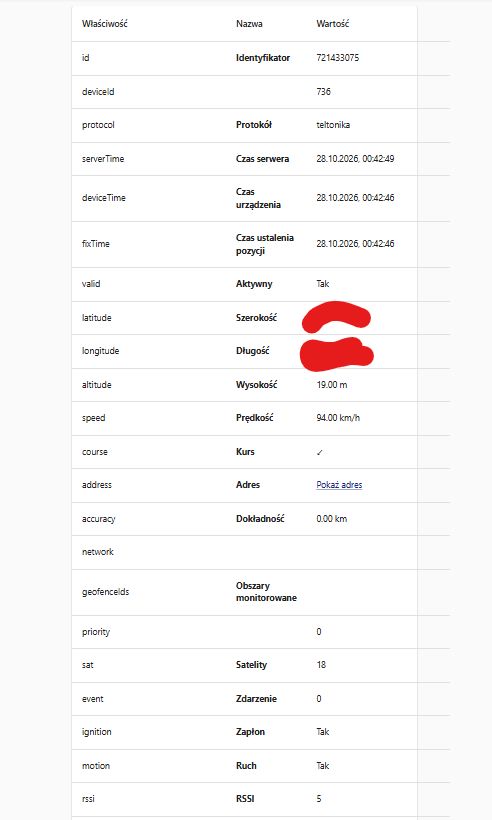
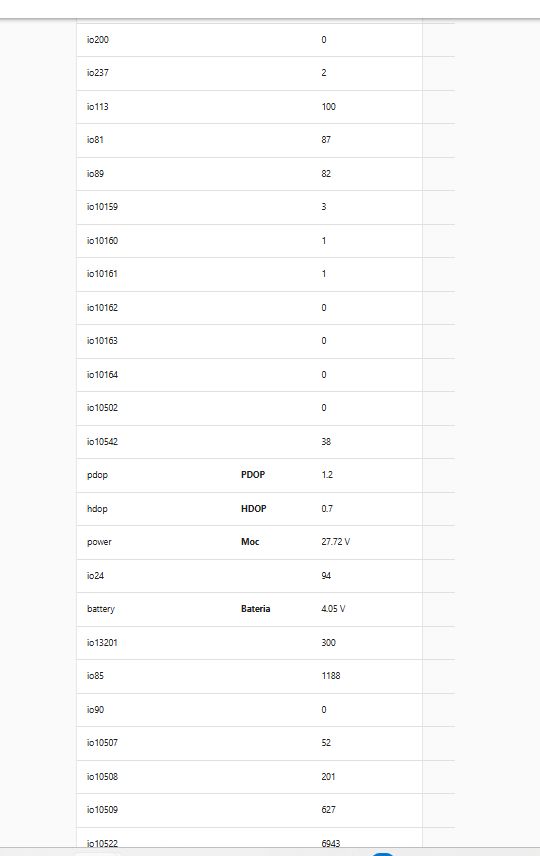
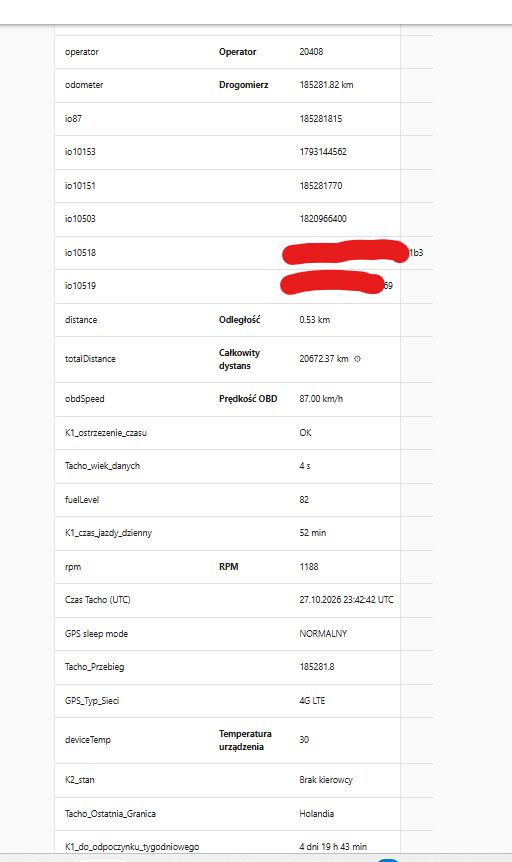
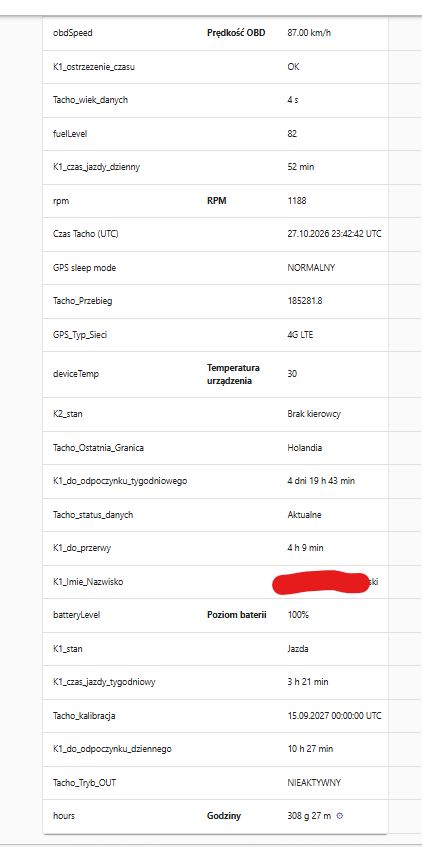
My question is mainly about the display order in the “More Details” table. The raw io... fields, recognized attributes, and computed attributes are currently mixed together, which makes the information difficult to read.
Ideally, I would like to customize their order. If that is not supported, placing raw io... attributes after the recognized and computed attributes would already be a useful improvement.
Another possible compromise would be to hide selected raw attributes from this table while keeping them available for calculations. For example, this could be configured at the device group level, allowing different attributes to be hidden for different device types.
The attached screenshots show both the raw inputs and the calculated information. Is there an existing way to control the display order or hide attributes only from this view?
As a separate UI observation, the table columns do not seem to accommodate longer values: some extend beyond the table’s right edge, as shown in the screenshot.


Hello,
I'm using Traccar with Teltonika GPS devices, including CAN bus and tachograph integrations.
I would like to ask whether it is possible to customize the order in which position attributes are displayed on the "More Details" page.
To clarify, I mean the page opened by clicking "More Details" in the vehicle popup on the map. This opens a page with a URL like
/position/{id}, containing a table with the columns Attribute / Name / Value.My devices report many different attributes, including:
odometer,fuelLevel,rpm,batteryLevelandobdSpeed.Tacho_statusandDriver_1_Status.io83,io89,io10153andio10530.Currently, these attributes are mixed together, which makes it difficult to find useful information quickly, especially on devices with many CAN and tachograph parameters.
Ideally, I would like them to appear in the following order:
ioXXattributes at the very bottom.I would like to keep all attributes visible, including the raw AVL values, because they are useful for diagnostics. I only want to change their display order.
My questions are:
ioXXattributes to the bottom?I think this would be especially useful for installations with a large number of computed attributes, CAN bus data and tachograph parameters.
Thank you!