Problems with Continuous Tracking

Following up on my previous note: I did some digging. I initially tried the latest Kotlin version and it worked fine, but then I realized you have a separate repository for the Flutter implementation.
I’ve been through previous releases to find the breaking point. Here is what I found:
v9.6.5: Works perfectly.
v9.7.0 (and newer): Continuous Tracking fails/terminates.
I’ve managed to pull a log for you while running the problematic version—see the attachment below.
Thanks!
Log: https://1drv.ms/u/c/06AFF54AD2EAE6D0/IQBn0Ti7U9o3R4laJ7K2Hfl3AYMCMADleN0jppagyJq3ElE?e=hITYgr

You need to provide some context for the logs.
The latest version is working perfectly for me.

Hi Josef, I'm having problems with the latest version of Traccar client and Android 16 on a Xiaomi Poco M7 phone. The strange thing is that I have another phone of the same model and it doesn't have these problems; it works fine. Could you please provide me with the link to the Traccar client version 9.6.5 that you mentioned works well for you?
The main problem is that when the phone is turned off or restarted, the Traccar client application does not start automatically, even though the phone's configuration is correct. I mean that it has no battery restrictions, is configured to autostart, and has all the necessary permissions to prevent it from being closed by the user.
You can always download old versions from GitHub:
Thank you so much Anton Tananaev
Hey @comaccsoporte, this one works for me:
https://github.com/traccar/traccar-client/releases/tag/v9.6.5
Thanks for reaching out @Anton Tananaev,
About context, what do you mean specifically? Basically, when I turn continuous tracking on, all the upcoming events to send the data are terminated as seen in the log. When doing manual "send location", it works.
On version 9.6.5 continuous tracking works, after that (9.7 and up), it does not.
Phone: Samsung Fold 5
P.S.: I think it goes without saying but really love the stack client+server you have developed. Thanks for it!
all the upcoming events to send the data are terminated as seen in the log
Can you provide an example of what you're referring to? What does it look like it in the log?
╔═════════════════════════════════════════════
║ ⏰ OneShot event fired: TERMINATE_EVENT
╠═════════════════════════════════════════════

02-27 21:31:11.340 DEBUG [LifecycleManager onStop] ☯️  onStop
02-27 21:31:11.338 DEBUG [LifecycleManager onPause] ☯️  onPause
02-27 21:31:09.818 INFO [TSScheduleManager oneShot]
  ⏰ Scheduled OneShot: TERMINATE_EVENT in 10000ms (jobID: -1708771588)
02-27 21:31:09.817 DEBUG [LifecycleManager c] ☯️ onWindowFocusChanged: false
02-27 21:29:31.004 DEBUG [LifecycleManager c] ☯️ onWindowFocusChanged: true
02-27 21:29:31.004 INFO [TSScheduleManager cancelOneShot]
  ⏰ Cancel OneShot: TERMINATE_EVENT
02-27 21:29:30.930 DEBUG [LifecycleManager onResume] ☯️  onResume
02-27 21:29:30.928 DEBUG [LifecycleManager onStart] ☯️  onStart
02-27 21:29:21.902 DEBUG [LifecycleManager onStop] ☯️  onStop
02-27 21:29:21.815 DEBUG [LifecycleManager onPause] ☯️  onPause
02-27 21:29:21.150 DEBUG [LifecycleManager c] ☯️ onWindowFocusChanged: false
02-27 21:29:21.150 INFO [TSScheduleManager oneShot]
And then it keeps going like this, not sending the location at all.
This is just showing that you closed the app.
OK, let me get better log now.
I'm having hard time to read the log to give you context. But what is happening: I start continuous tracking, it immediately stops. I send one point manually, it works. I start continuous tracking again, it immediately stops. When I use 9.6.5, it goes continuously.
This is my settings: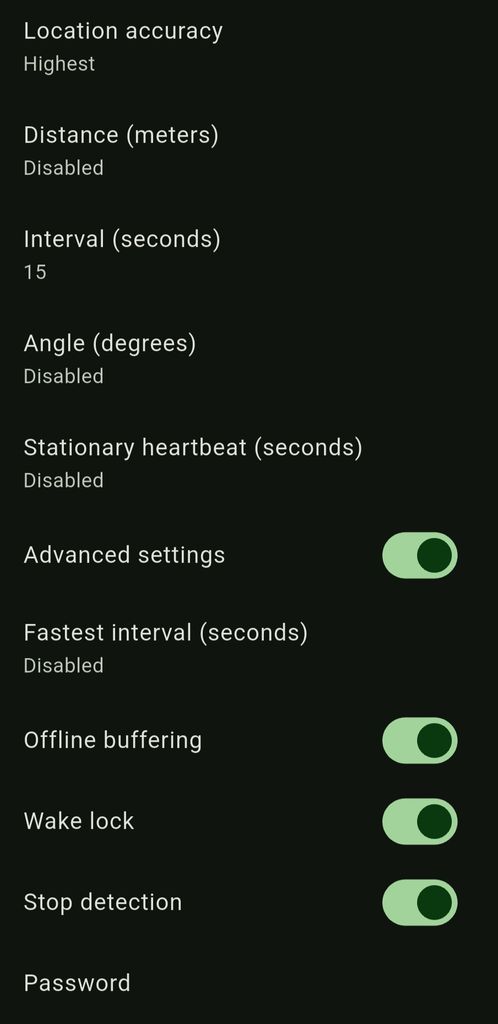
It probably goes into stationary mode. What's color do you see the continuous tracking switch?
Log is here: https://1drv.ms/u/c/06AFF54AD2EAE6D0/IQBMuPs8WpOWRZVYMNLl2nPIAWksuxZP0saUMZ5N3XbACR4?e=jTzcHa
You should be able to kind of see what I have described above.
Hey,
Just wanted to give you a heads-up that continuous tracking isn't working for me on the latest build. I’ve since downgraded to the previous GitHub release (really old one), and everything is back to working flawlessly.
Given how quickly you push updates (three versions in three days?), I figured this might already be on your radar?
I can’t grab logs for you right this second (I’m in desperate need of stable tracking today), but the behavior looked like the OS was terminating the event prematurely. I tinkered with a few settings, but nothing seemed to stick.
Specs:
OS: Android 16
App Version: 9.7.12
Is this a known regression with the new update, or am I a bit of an outlier here?
Thanks!