Select a different language in notifications


You have to re-apply your changes on top of new notification templates.
Great Anton, thanks a lot at always. So, for push notifications, only apply the lines subject and digest?
And how Traccar use different languages?
/opt/traccar/templates/notifications/en
#set($subject = "$device.name: has entered geofence")
#set($digest = "$device.name has entered geofence $geofence.name at $dateTool.format('yyyy-MM-dd HH:mm:ss', $event.eventTime, $locale, $timezone)")
<!DOCTYPE html>
<html>
<body>
Device: $device.name<br>
Has entered geofence: $geofence.name<br>
Time: $dateTool.format('yyyy-MM-dd HH:mm:ss', $event.eventTime, $locale, $timezone)<br>
Point: <a href="$webUrl/event/$event.id">#{if}($position.address)$position.address#{else}$position.latitude°, $position.longitude°#{end}</a><br>
<br>
<a href="$webUrl/settings/notifications?token=$token">Unsubscribe</a>
</body>
</html>
Yes, instead of separate short notification templates we now use $digest.
Thanks Anton, thanks you, I will use digest for now.
Only remember when you have time, to change the doc page https://www.traccar.org/notifications/#push
My proposal to start the change:
Templates
Traccar uses Velocity Engine for notification templates.Emails use the long version and most other channels use the the short version of the templates.General notifications use the *.vm files located on/templates/notificationsand can be edited. Push notifications are created using the same files but sending only the$digestline.Templates can be easily adjusted to your needs or translated. Template *.vm files must be in the UTF-8 encoding.
Updated.
Excuse Anton, the UI of Traccar webpage when I sign in is spanish, but I receive the notifications in english. Where can we select the language?
Or i must replace the english text with spanish in the .VM english file?
You need to set the language in the account or user settings.

You can also add in language attributes on the server.

Hi Anton, I haven't found a place to change the test message in the .vm notifications.
In fact, if we send a test message, only
(***)
(***)
You can't change test message.
is it possible to change it by modifying the code?
Anything is possible in the code.
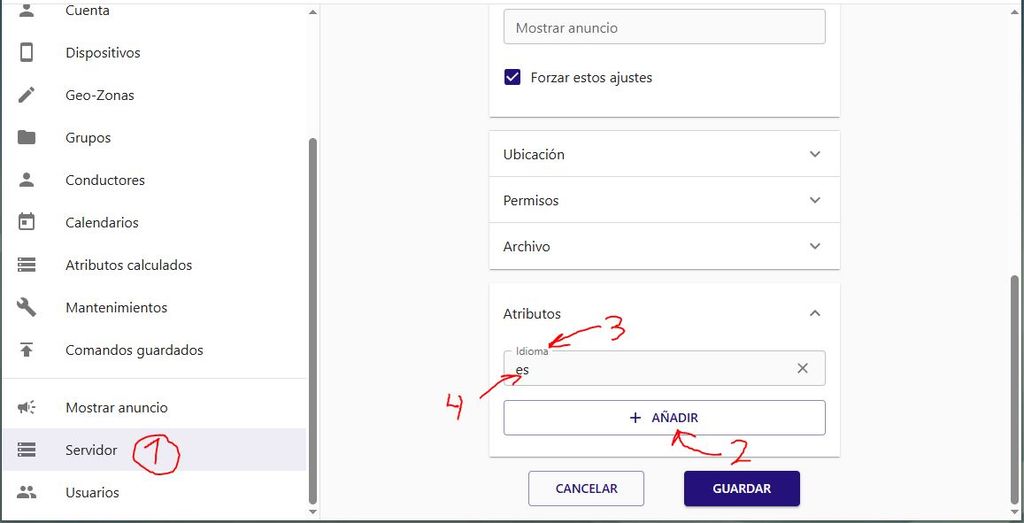
Solved with atributes and code of language
Valid changing it from Server or User configuration
Add atribute -> Language -> write code of available language. At 10/2025: de, el, en, es, pl, pt_BR
Hello!
I updated from 6.6 to 6.10 and see there was several changes in localization and files that create notifications,
I would like to change the message of some of triggers like "entering or exiting geofences, but it does not seems works.
If I send a test message, it appear in my phone like
After the update I changed the files of
traccar/templates/short/geofenceEnter.vmand worked fine, but now this folder not exist and other not seems to work.Is neccessary add a new line in
traccar.xmlwith the main language? I searched in your Documentation but didnt find a solution.