SPOT Gen 4 using Traccar


Are they restricting forwarding to arbitrary servers?
I don't know. Within my spot account it is asking for a Third Party Identification Code, which i don't know. Otherwise everything i have managed to find say that Spot is recognised by Traccar
Never heard about Third Party Identification Code.
OK digging deeper i found this script....which i have no clue what to do with or what to change
package org.traccar.protocol;

import io.netty.handler.codec.http.HttpMethod;
import org.junit.jupiter.api.Test;
import org.traccar.ProtocolTest;

public class SpotProtocolDecoderTest extends ProtocolTest {

    @Test
    public void testDecode() throws Exception {

        var decoder = inject(new SpotProtocolDecoder(null));

        verifyPositions(decoder, request(HttpMethod.POST, "/", buffer(
                "<?xml version=\"1.0\" encoding=\"UTF-8\" standalone=\"yes\"?>\n",
                "<messageList xmlns=\"http://v2.shared.globalstar.com\" xmlns:xsi=\"http://www.w3.org/2001/XMLSchema-instance\" xsi:schemaLocation=\"http://v2.shared.globalstar.com http://share.findmespot.com/shared/schema/spotXml-v2.xsd\">\n",
                "<header>\n",
                "<totalCount>1</totalCount>\n",
                "<mode>LIVE</mode>\n",
                "</header>\n",
                "<message>\n",
                "<id>891801957</id>\n",
                "<esn>0-3112123</esn>\n",
                "<esnName>0-3112123a</esnName>\n",
                "<messageType>NEWMOVEMENT</messageType>\n",
                "<messageDetail>SPOT Trace has detected that the asset has moved.</messageDetail>\n",
                "<timestamp>2017-12-27T13:19:38.000Z</timestamp>\n",
                "<timeInGMTSecond>1514380778</timeInGMTSecond>\n",
                "<latitude>-1.28781</latitude>\n",
                "<longitude>-47.93042</longitude>\n",
                "<batteryState>GOOD</batteryState>\n",
                "</message>\n",
                "</messageList>")));

    }

}
i wouldn't even know where to put this or set it up...but from reading this is some sort of test to find out the 3rd ID ......maybe this is beyond my reach....... :-(
You don't need to put this anywhere. You need to configure your device to report data to the server.
And this is all i have to be able to do that ..
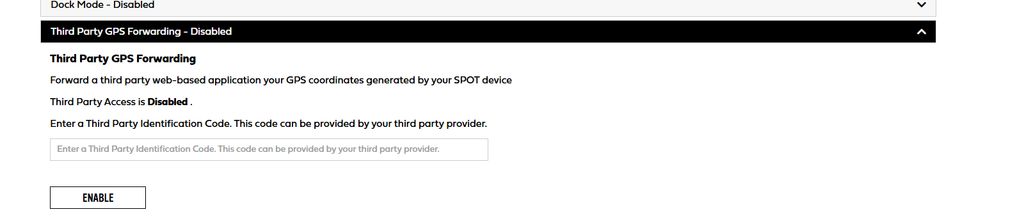
I'm not sure what the configuration should look like. That's something you should ask the vendor.
I will contact spot tomorrow and ask.....thanks for your help so far. M
Hi all, new to all this, i have recently downloaded and install Traccar 6.13.3 which seems to be running on localhost fine. I have 2 Spot Gen 4 devices which i would like to add, i have added them with the IMEI numbers but not getting any reading in the Traccar app. Looking through the my findmespot account it has a tab for "3rd Party GPS Forwarding" which is disabled. When i try to enable it asks for a Third Party Identification Code which can be provided by your 3rd party. I can't find this anywhere or i am missing something completely here. I have found the protocol as Spot and the port #5156. Where do i put this in. All i want to do is have a single place to monitor 2 devices with have different spot accounts. Thanks in advance for your help. M