Hello I am receiving following data from my Teltonika GH5200:
2026-06-09 21:08:53  INFO: [T0f900d6c] connected
2026-06-09 21:08:53  INFO: [T0f900d6c: teltonika < 176.7.131.69] 000f333534303032333931373530353931
2026-06-09 21:08:53  INFO: [T0f900d6c: teltonika > 176.7.131.69] 01
2026-06-09 21:08:55  INFO: [T0f900d6c: teltonika < 176.7.131.69] 000000000000015f8e040000019eae308948010000000000000000000000000000000185000d000700f00100150200c8000045020071640074010185<b>41</b>000400b5000000b60000001800000043100a000200f10000665b035600000005000000000000019eae328518010000000000000000000000000000000185000d000700f00000150200c800004502007164007401018551000400b5000000b60000001800000043100a000200f10000665b035600000005000000000000019eae3315a0010000000000000000000000000000000185000d000700f00100150200c800004502007164007401018551000400b5000000b60000001800000043100a000200f10000665b035600000005000000000000019eae376ee8010000000000000000000000000000000185000d000700f00000150200c800004502007164007401018551000400b5000000b60000001800000043100a000200f10000665b03560000000500000000040000fbee
2026-06-09 21:08:55  INFO: [T0f900d6c: teltonika > 176.7.131.69] 00000004
2026-06-09 21:08:58  INFO: [T0f900d6c] id: 354002391750591, time: 2026-06-09 21:01:17, lat: 0.00000, lon: 0.00000, course: 0.0
2026-06-09 21:08:58  INFO: [T0f900d6c] id: 354002391750591, time: 2026-06-09 21:03:27, lat: 0.00000, lon: 0.00000, course: 0.0
2026-06-09 21:08:58  INFO: [T0f900d6c] id: 354002391750591, time: 2026-06-09 21:04:04, lat: 0.00000, lon: 0.00000, course: 0.0
2026-06-09 21:08:58  INFO: [T0f900d6c] id: 354002391750591, time: 2026-06-09 21:08:49, lat: 0.00000, lon: 0.00000, course: 0.0
I need to have the Value "41" following the 185 being extracted. What is the best practice for that?
Thanks in advance for any help.
Are you trying to say it's not? We should be decoding all parameters for Teltonika by default.
Dear Anton, thank you or the quick answer.
All i'm gettingis logs like above an the decoded values like in the screenshot.
For me it seems like not all of the values are decoded.
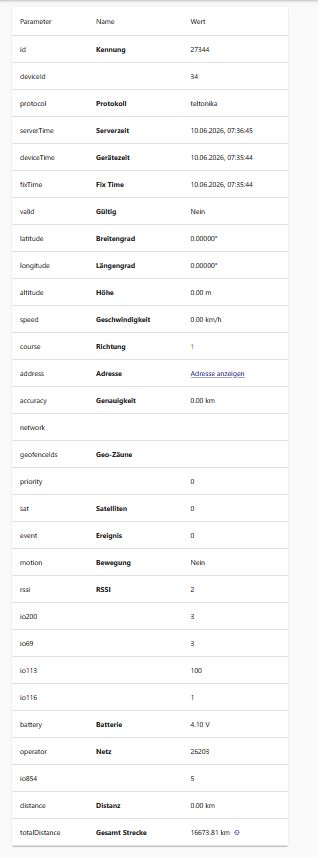
What can i do to decode them?
It is already decoded. I just verified it locally.
What you have on the screenshot doesn't match the sample you provided, which means you're looking at a completely different data point.


Hello I am receiving following data from my Teltonika GH5200:
I need to have the Value "41" following the 185 being extracted. What is the best practice for that?
Thanks in advance for any help.