Time format


We are not using any framework for time formatting. We're using the browser.
Traccar Manager Android app I was referring to is not a browser. I have just tried FireFox for Android and to show the time on Traccar web interface it does follow the time format setting regardless of what system language is. On the contrary, Traccar Manager app on the same Android phone ignores the time format setting and displays time in a format dependent the system language setting. That is not very intuitive
Traccar Manager uses the browser engine (WebView).
You are correct it is a webview issue. Top firefox and bottom is chrome (splitscreen screenshot):


Is the issue of changing the date format from 12-hour AM/PM to 24-hour still relevant? I’m currently facing the same problem and can’t find a solution. The client machine I’m using to view the server’s website runs Windows 7 64-bit; the browsers are various—Firefox, Maxthon, Brave, Opera. The server itself is on a Windows 10 machine with a 24-hour time zone set to Estonia, and the client machine is the same. Multiple devices. all same.
Traccar will use preferences that are set by the browser / OS. It has nothing to do with server.
Hi Anton, thank for answer but my all pc settings is correct timezone, regional setting and so on, also as i wrote I already checked on 5-6 browsers. I checked both the server computer (Windows 10 Pro) and the client computer (Windows 7 Pro). Unfortunately, I can't find an explanation, but when I view the same server through the Traccar Android client app, the date format is correct. In other words, when I access it via a browser on a regular computer, it's incorrect, but on Android, it's correct. There must be some deviation somewhere that’s causing this to go unnoticed.
Date formatting is done by the browser.
Ok, I tried out various
I used maxton, opera, brave, edge, waterfox, chrome on win 7
chromium- OK, konqueror (not showing website) on q4os
firefox- OK linux mint
firefox OK MXlinux
firefox OK Antix
edge NO, firefox NO win 10 (another laptop) ... so It seems that this problem is related to Windows machines.
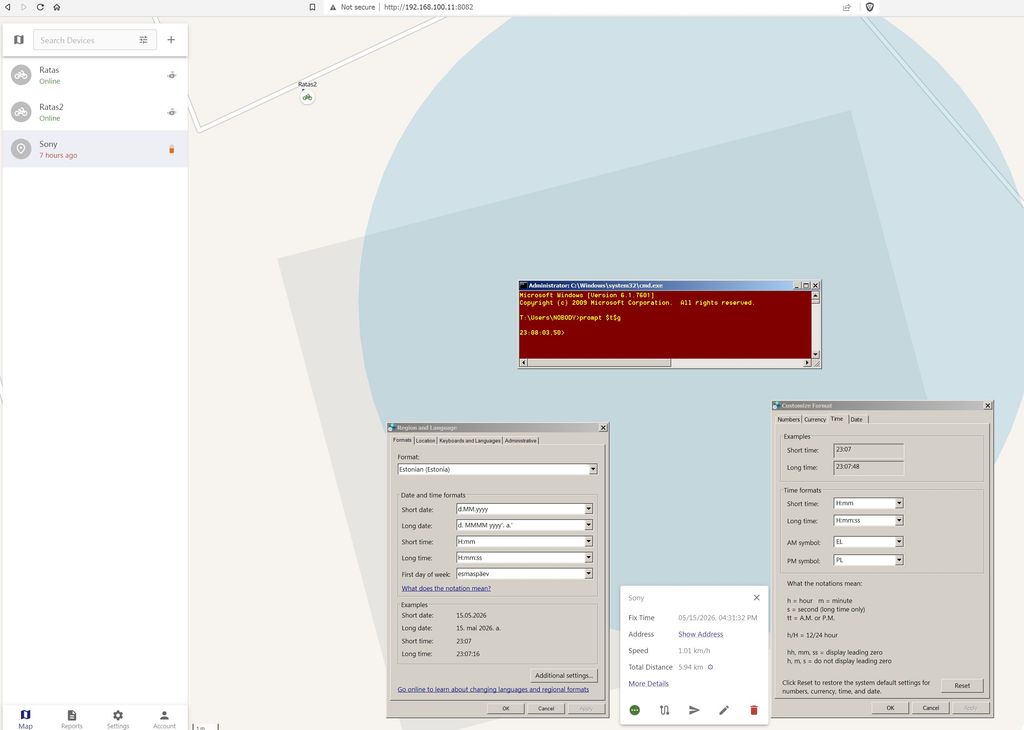
I also tried Hirens Win 11 PE env
firefox-NO, chrome- also NO
Not sure about most because the only other places I use time/date extensively enough to matter to the point I would have to change between AM vs PM and MM/DD/YYYY vs DD/MM/YYYY are calendar and messaging. Both gmail and Google Calendar have that option in the web settings. As for android app pardon a small criticism of otherwise great app the framework you are using is broken. For example, the calendar app I use aCalendar+ and the mail app FairMail both follow the time format setting I have in the screenshot above and not the system language setting.