Relay app for Google Find Hub devices


ok, I have now understood how it works.
These are the necessary steps.
- Register on https://www.traccar.org/ , and in upper right corner, after logging in, note the api key
- Edit the traccar.xml conf ( usually in /opt/traccar/conf/traccar.xml ) and add these two string
    <entry key='notificator.types'>traccar,...</entry>
    <entry key='notificator.traccar.key'>aaaabbbbbcccccdddddeeeefffggghhhjjjjj</entry>          (<- insert here the api key from traccar account)
3)Install traccar relay app
4) make all authentication proces using your google account ( two times needed and device's pin is asked )
5) set the Server url of your traccar sarver ( for me http://hostname:port ) into the traccar replay app
6) you can see all the devices of your google account, listed in Google Find Hub, with a very log id for every one
7) Add a new device in traccar server with name , what you wish, and device id , the id of the device taken from the traccar relay app, of the device you are interested to.
8)close/kill the relay app of traccar
9)start relay app again ( this step is needed because in this way it's sure that relay app sync the device id with the added device into traccar )
10) in traccar server you can now click on your google device and clicking on command icon ( it seems an air paper ) , you can see 4 command
- single report
- periodic report
- stop reports
- factory reset
- clicking on single reprot, after some seconds, you will have the position of your google device.
- setting periodic report time, you have scheduled position report update.
(I hope I haven't forgotten anything and that I've written everything correctly. )

Well done - that's how it's done. A documentation that was dearly missing.

thank you @pizzulicchio for the explanation, it works great!
One question Anton, the periodic report has the following options: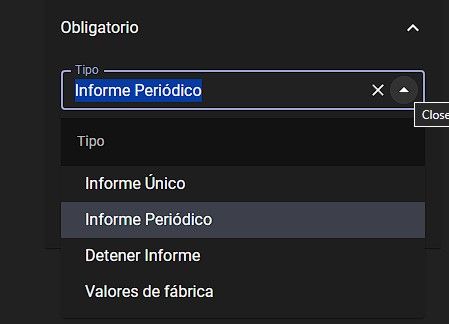
(sorry for spanish, don't know how to change the language) unique, periodic, stop report, factory values.
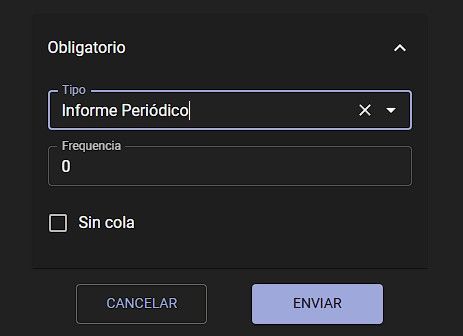
If I set the report to periodic, the value is in seconds, hours or other?
I tried 24, but I guess now it is in seconds because I'm getting a lot of events. Is that consuming some king of google api limit?
I think that the "periodic" expression it's in seconds.
I'm using a similar integration of Google Find Hub on Home Assistant ( a domotic/automation tool ) and it's using the same approach.
They suggest to keep the interval update between 30 and 60 seconds. It's not known the "rate limit" of update = google update request.
The value is in seconds.

I tried using the app on two different tablets, a Lenovo M9 and an M11, both running Android 14. There was some kind of error with the notification service. The app communicates with my Traccar server on startup, but it can't retrieve notifications from the Google app, and therefore sends coordinates of 0,0 to the server and doesn't update positions. Furthermore, the devices don't allow me to choose permissions (battery, notifications, data usage, etc.) because the app wasn't downloaded from the Play Store. Android restrictions apply. Any suggestions on how to work around this and make it work?
but it can't retrieve notifications from the Google app
What exactly do you mean by this?
he devices don't allow me to choose permissions
I don't understand. What permissions? The app doesn't require any permissions.
I may have been too direct. In fact: 1- I installed the application normally, 2- I configured my Traccar server with the entry keys (I obtained the API from the website) and when I start the app, it connects to the Traccar server and my tags show 'connected'. However, without any coordinates, showing all at (0,0) with dates from 1980. Therefore, using Gemini to find a simple solution, I ended up receiving instructions about permissions, monitoring app notifications, battery, among other things that I thought were correct. And didnt work as well. But the fact is, when I open the app it connects to my Traccar, it reports invalid date and coordinate data and does not generate any subsequent updates.
Gemini gave you complete nonsense. It is expected that when you open the app, it will connect to the server, but it doesn't upload location, but instead just a push token. To get actual location, you have to send a command from the server.
So it was right from the start. And it's really working. Thank you Anton Tananaev. And also thank you to pizzulicchio for the tutorial, especially item "10".

Can you see logs on the self-hosted traccar server when a command is executed? I see nothing appearing in the traccar log when requesting a position from a google find device. Relay app installed and connected to my traccar server, I added the keys for the push-notifications into my traccar server config and restarted. I see the initial 'registration' of the google find devices in the traccar server. I installed traccar preview-version, downloaded yesterday. Relay app is downloaded today, so all latest versions.
OMG. Just ignore my previous question... I was already running the Relay app in debug mode on 2 different android devices trying to find what was going wrong. I figured out it was the FCM-stuff not correctly working. And then -when double checking the key in my account here on traccar- I saw that I made a very minor paste error when putting it in my traccar.xml conf file. Doh! it is working now.
Ok, another question: Can you retrieve battery state of the devices? Or is this not available through Google Find...?
I don't see it even in the official app.
The app will show you commands that you can send.
Yes. The API key from your account is what you should use.