Major Traccar Client update


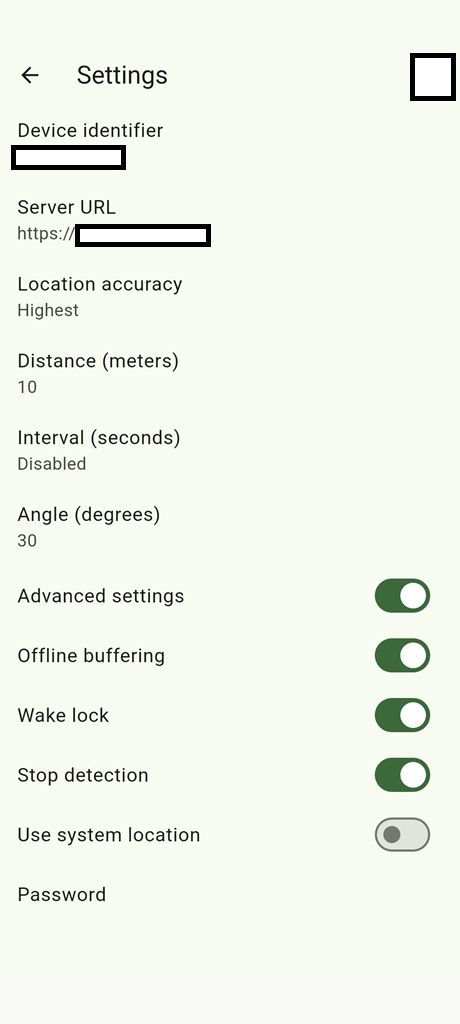
The issue is likely because you set the interval to zero.

The query/form version of the OsmAnd protocol doesn't specifically cater for SOS alarms. Is there a possibility for a custom attribute e.g. alarm=sos to handle the 'Send SOS' function in the new client?

The Version 10 works good on my Fairphone with e/OS 3.7
I am having an unexpected error on my Samsung S25 Ultra. A few hours after migrating to 10 the log only shows Network offline and Network online about 10 Minutes. The no logs for hours. There are no log entries the whole night. After reboot this morning the S25 the client log shows the reboot and that a geofence is registered. The the log stops and the traccar manager shows the last position from yesterday and no current information. I had to start the tracking service manually. The notification appears but no position. When i send the position manually there was a new log entry: Position requested and after 30 seconds: Position request: No fix. But every other app got the current position. Traccar Manager, GoogleMaps. After i used other apps and send the position manually again the client send the position only once.
Could it be that the phone needs about 10 Minutes to geht a fix? If yes: why are the other apps showing the position eaelier? Why the client stops again?
In the app infos the OS shows the last time the client requested the device position. It is the time when i send it manually.
The after 4 minutes:
Geofence removed
Heartbeat alarm cancelled
Service destroyed
Using AndroidLocationSource
Service created
Geofence registered
In the manager there are no updates and the shown position is not the real device position.
Settings are in every device the same
Accuracy highest
Distance 20 m
Intervall 120 seconds
Angle 15
Offline buffer on
Wakelock on
Stopp detection off
Use system location on

I was going to hold back on my feedback for another day untill I get a chance to test it again just to be sure of what is going on but it seems like I am not the only one with issues
My settings are
Accuracy: highest
Distance : 300
Interval 30
Angle 90
Offline buffering off
Wakelock on
Stop detection on
Use system location off
When I took the phone for a walk yesterday, the old version was able to detecting walking activity after about 100 meters of walking while the new app didn't detect walking as the activity for as long as I was walking and after about 1 kilometer I turned off continuous tracking and turned it back on again and only then did it detect walking and location updates were accurate. Problem is stop detection didn't engage. The old app used to detect being stationary after being in moving state after about maybe 3 to 4 minutes, the new app however just kept gps constantly on even after 20 minutes of being completely stationary.
Plus I, at some point when trying to figure out why it wasn't detecting movement when I first started moving checked the logs and it said network offline multiple times then network online and no other log entries.
I will try again since you have released another version after my test so I am not sure whether it will work any better.
AussieTraccar, we will add SOS support later. For now we just need to make sure the core of the app is solid.
IamNeo, you enabled "Use system location" and highest accuracy. This means GPS only, which would explain why the fix is slow. Why did you enable that option?
Antony, can you please email full logs and point where exactly activity change didn't work.
Small Android update that should improve motion detection:
https://traccar.nyc3.digitaloceanspaces.com/download/app-release.apk
IamNeo, you enabled "Use system location" and highest accuracy. This means GPS only, which would explain why the fix is slow. Why did you enable that option?
Because I did it before and don't know how the new option works. How does the app settings work with the system location? Do have a optimal setting you suggest?
If you don't know how something works, I strongly recommend you don't touch those options. Why did you enable that option?
Because i saw that the position the client show and the position my device show arent the same. So i choose the the more accurate option. The second problem one of my phones has that the client consumes too much energy. So i thought it is better only one service should get the position and the traccar client app uses this data instead oft using the complete gnss stack. The energy consumtion is much better with that settings. I am very happy about that.
Thanks for implementing that.
The issue is likely because you set the interval to zero.
So the "Interval" field in the new client does not provide the same functionality as it did in the old client?
Interval - if distance is set to 0 (Android only) or accuracy is highest, this parameters allows time-based tracking; again, the result is not guaranteed.
I don't need time based tracking, so I have it disabled.
I was asking if we could get the Fastest Interval field added to the new client so I can have it upload one location update every two seconds or so at most. Right now it's unnecessarily uploading way too often, even when just walking.
It works a bit differently from the documented approach. Zero simply means you get every location.
Sorry. didn't get a chance to email you the logs you asked for. The past couple of days were crazy busy for me. I will test the most recent version today and report back within the upcoming 24 hours and hopefully these issues were fixed.
I can see you've poured considerable effort into this major update, and I genuinely applaud your work in bringing all of Traccar's components in-house. While the 3rd party SDK was working fine, having complete control over the entire stack is a always better.
I have just managed to test the latest version and it is aweeeesomeeee. It worked flawlessly for me. It picked up on the movement and switched over to a moving state turning the gps on within about a minute from moving and in a couple of minutes after becoming stationary. It switched the gps off and switched over to stationary mode. Everything worked as intended and all issues previously reported are fixed. The only thing missing now is a stationary heartbeat indicating the device is online once every x seconds like in the old app.
My tests were all on
Accuracy: highest
device with play services with use device location option toggled off
Wakelock on
Stop detection on
What was your configuration?